AI Face Generation
Generate photorealistic faces in seconds and send the best shots straight into Upscale, Face Swap, Video or Carousel workflows.
What the AI Face Generation tool does
AI Face Generation converts a set of appearance parameters — gender, age band, ethnicity, hair & eye details, body type, beard, makeup — into unique portraits in ≈15s. Every result is royalty-free for commercial use and can cascade automatically into any other Creator OS tool.
Interface tour
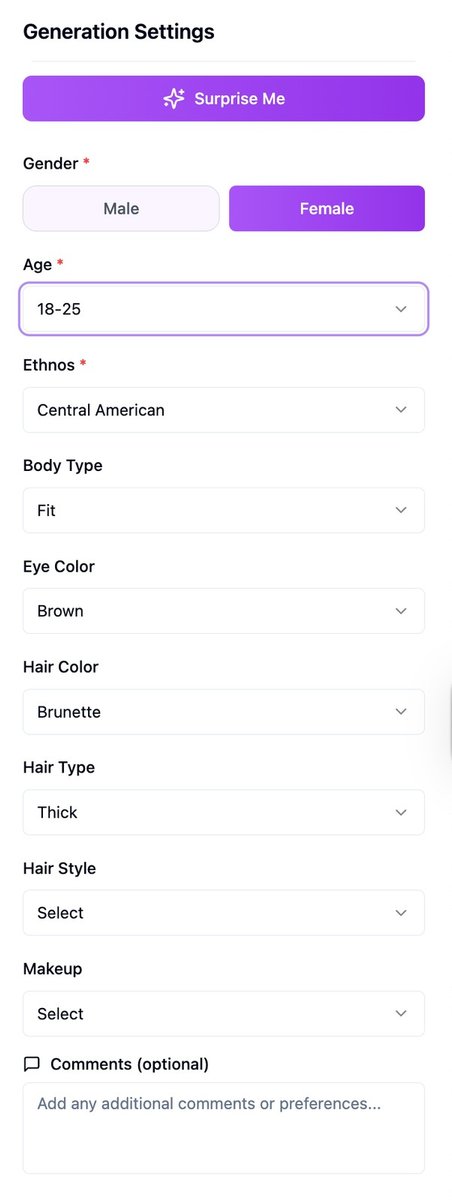
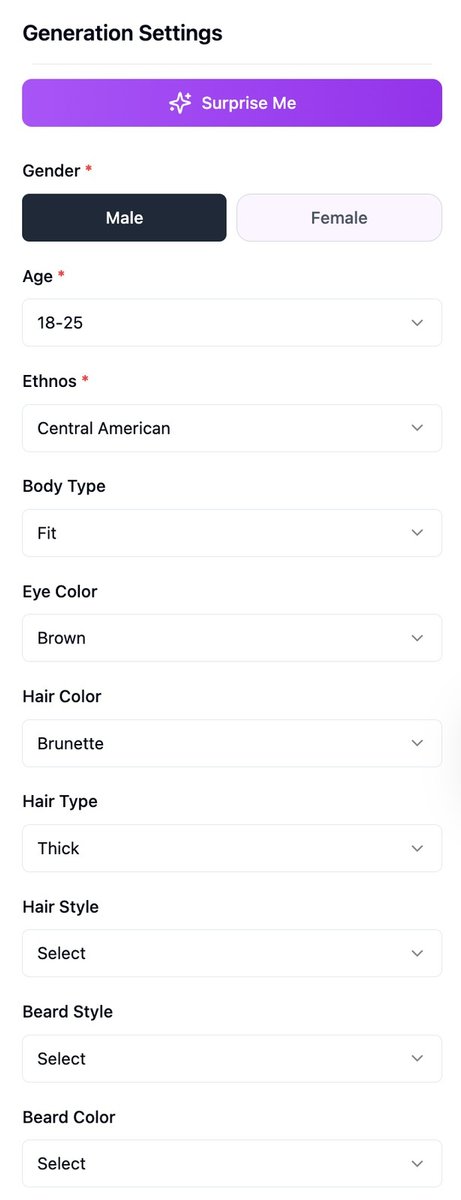
- Surprise Me (big purple button, top) Quickly fills every field with a random, production-ready combo—perfect for inspiration or rapid A/B batches.
- Gender (required) Toggle Male or Female. One choice is mandatory.
- Age (required) Eight presets: 18-25, 26-35, 36-45, 46-55, 56-65, 66-75, 76-85, 85+.
- Ethnos (required) Broad ethnic classes — Asian, Black, Hispanic, Middle-Eastern, White, etc.
- Body Type Slim, Athletic, Average, Plus-size, and more.
- Eye Colour & Hair Colour Natural and fantasy shades.
- Hair Type / Hair Style Curly, wavy, straight + bun, ponytail, undercut, etc.
- Beard Style / Colour (visible only when Male is selected) Clean-shaven to full beard; blond to jet-black.
- Make-up (visible only when Female is selected) None, Natural, Glam, or Creative.
- Start Generation Triggers the job. The cost (credits per image) is displayed right above. Fields with a red asterisk are required.
Quick-start walkthrough

- Choose traits or smash Surprise Me.
- Confirm the cost and hit Start Generation. A task tile appears on the left (“facegen-YYYY-MM-DD-HH-MM-ID”).
- Watch status – Created → Processing → Completed / Failed. Time-outs auto-retry once; persistent fails are flagged.
- Click the task tile (or View X/4 Generations) to open the Results page.
Actions on results

- Select / Deselect: Use the checkbox in each thumbnail corner.
- Retry Failed: visible if any of the four render errors out.
- Send Selected to Tool: open the mini-launcher for Face Swap, Upscaler, Generator by Ref, Video Generator, or Carousel.
- Download Selected / Download All: one-click ZIP export.
- Create Cloud Archive: store images straight to your connected S3 or Google Drive bucket.
Pro tips
- Batch like a pro → queue 50+ jobs; GPU auto-scaling keeps average wait ≈15 – 25s.
- Use Surprise Me three times, favourite the best eight faces, then pipe to Upscale → Carousel for a polished “Meet the Team” social post in under five minutes.
FAQ
How many faces per run? From 1 to 4.
Do I own the images? Yes — full commercial license, no attribution needed.
Can I upload a reference face? For matching style or expression, yes — use Generator by Ref after your first run.
Troubleshooting
Job stuck in “Queued” >60 s Please write to support, and we will check what we can do.
Blurry outputs Send directly to Upscaler.