Canva AI Image Generator: 5 Better Alternatives (2026)
Canva's Magic Media is convenient but limited. Here are 5 AI image generators that outperform it in quality, control, and creative freedom for 2026.

2-Minute Answer
Canva's AI image generator (Magic Media) is built for quick mockups inside Canva's design editor — not for serious AI image generation. It scores 5-6/10 on quality benchmarks, has no batch processing, enforces strict content filters, and shares credits across all Canva AI tools[1]. If you need photorealistic output, character consistency, creative freedom, or video generation, a dedicated AI platform does the job better. ZenCreator is the strongest all-around pick — 12 tools, three video engines, and no content restrictions.
What are the main limitations of Canva's AI image generator?
Magic Media works as a convenient add-on inside Canva's design editor, but it has real constraints that dedicated AI tools don't.
| Limitation | What it means |
|---|---|
| Shared credit pool | AI credits are split across Magic Media, Magic Write, Magic Eraser, and Magic Expand — use one, lose from all |
| Single model, no control | One undisclosed model, no parameter tuning, no model selection |
| Max 1024×1024 on lower tiers | Output resolution caps out well below what dedicated generators offer |
| No batch processing | One prompt at a time — no queue, no bulk generation |
| Strict content filters | All prompts go through content moderation. Anything suggestive, edgy, or adult is blocked |
| Text rendering: 3/10 | AI-generated text inside images is unreadable more often than not[1] |
| No video generation | Magic Media generates images only — no image-to-video, no animation |
| No character consistency | Every generation produces a different person. No face locking or reference system |
Canva is great as a design tool. But its AI generation is a side feature, not a core competency.
What are the best alternatives to Canva's AI image generator?
Here are five dedicated platforms that handle AI image generation as their primary function — not an add-on.
1. ZenCreator — best for character-driven content and full pipeline
ZenCreator isn't just an image generator. It's a 12-tool content platform that covers the entire workflow from character creation to social publishing.
Where it beats Canva:
- 12 specialized tools vs Canva's single Magic Media feature — Text-to-Image, Image-to-Image, Face Swap, PhotoShoot (40+ themed categories), Image-to-Video, Lipsync, and more
- Character consistency — generate a face once, apply it across hundreds of images and videos with Face Swap. Canva generates a different person every time
- Batch generation — create 100+ images in one run. Canva processes one prompt at a time
- Three video engines — Kling 1.6 (fast), Kling 2.0 (photorealistic), WAN (unrestricted). Canva has no video generation from AI images
- No content filters — the WAN engine generates without restrictions. Canva blocks anything remotely edgy
- Pay-once credits that never expire — no monthly subscription, no credit reset
Best for: AI influencer creators, content teams producing at scale, anyone who needs the same character across hundreds of assets, creators who need unrestricted output.
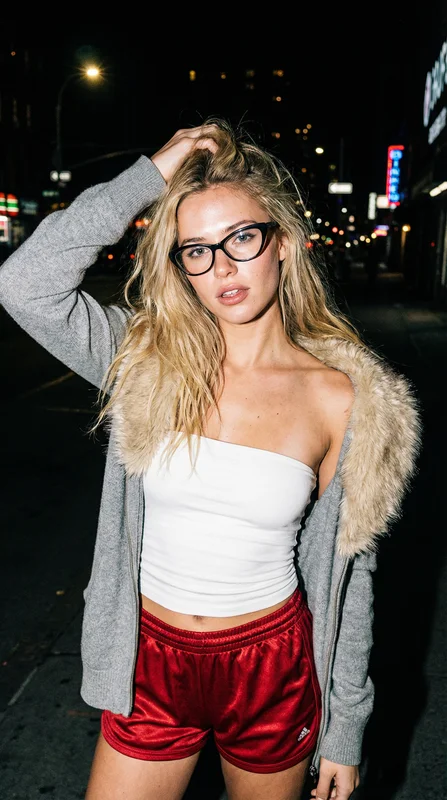
Here's a real output from ZenCreator's Text-to-Image tool:
Try ZenCreator's Text-to-Image →
2. Leonardo AI — best for stylized art and community models
Leonardo AI focuses on image generation with a strong community model library. Users can fine-tune models and share them, which gives access to specialized styles you won't find on generic platforms.
Where it beats Canva: Multiple model options (including community-trained ones), higher resolution output, real-time canvas editing, and a dedicated generation interface with parameter control.
Trade-off vs ZenCreator: Leonardo has good image generation but lacks Face Swap for character consistency, has fewer video options, and no direct social publishing. It uses a subscription model with monthly credit resets.
Best for: Digital artists who want model variety and community-trained styles.
3. Midjourney — best for artistic quality
Midjourney consistently produces some of the most aesthetically refined AI images available. The output has a distinctive look that's immediately recognizable — strong composition, rich colors, and high detail.
Where it beats Canva: Output quality is in a different league. Midjourney's V6 model produces images that can pass for professional photography in many cases.
Trade-off vs ZenCreator: Discord-based workflow (no web UI for generation), no face swap or character consistency tools, no video generation, strict content policy, and a monthly subscription model.
Best for: Creators who prioritize artistic quality above everything else and don't need a full content pipeline.
4. Adobe Firefly — best for commercial safety
Adobe Firefly is trained exclusively on licensed content (Adobe Stock, public domain), making it the safest choice for commercial use with minimal copyright risk.
Where it beats Canva: Higher quality, better integration with Photoshop/Illustrator, and explicit commercial licensing with IP indemnification for enterprise users.
Trade-off vs ZenCreator: Strict content filters (even tighter than Canva), no face swap, no video generation from images, and tied to Adobe's subscription ecosystem.
Best for: Brand teams and agencies that need airtight IP compliance.
5. Flux (via Replicate or ComfyUI) — best for technical control
Flux is an open-weight model you can run locally or through API services like Replicate. Full parameter control, no content filters when self-hosted, and growing community support.
Where it beats Canva: Complete control over every generation parameter, no content restrictions when self-hosted, and no per-image credit costs on your own hardware.
Trade-off vs ZenCreator: Requires technical setup (Python, GPU, or API billing). No built-in face swap, no video generation, no publishing tools. It's a raw model, not a platform.
Best for: Developers and technical creators who want maximum control and are comfortable with command-line tools.
How do these alternatives compare side by side?
| Feature | Canva Magic Media | ZenCreator | Leonardo AI | Midjourney | Adobe Firefly | Flux |
|---|---|---|---|---|---|---|
| Primary purpose | Design add-on | Full content platform | Image generation | Image generation | Commercial-safe images | Raw model |
| Image quality | 5-6/10 | 8/10 | 8/10 | 9/10 | 7/10 | 8/10 |
| Character consistency | None | Face Swap + Identity Lock | Limited | None | None | Manual (LoRA) |
| Video generation | None | 3 engines (Kling, WAN) | Limited | None | None | None |
| Batch generation | 1 at a time | 100+ at once | Up to 8 | 4 per prompt | 4 per prompt | Unlimited (self-hosted) |
| Content restrictions | Strict | None (WAN engine) | Moderate | Strict | Very strict | None (self-hosted) |
| Pricing model | Subscription | Pay-once credits | Subscription | Subscription | Subscription | API billing or self-hosted |
| Ease of use | Very easy | Easy | Moderate | Moderate (Discord) | Easy | Hard (technical) |
Is Canva's AI image generator good enough for social media content?
For basic mockups and quick drafts inside Canva's editor — yes. If you're already designing a social media post in Canva and need a quick background or illustration, Magic Media saves you from leaving the editor.
But for any content where quality matters — influencer posts, product marketing, branded campaigns — the output quality gap between Canva and dedicated generators is visible. Batch limitations also make it impractical for producing content at scale.
Can I use Canva AI-generated images commercially?
Canva Pro users can use Magic Media outputs commercially under Canva's content license. However, AI-generated images are subject to additional terms[2]. The AI model is undisclosed, which makes the IP provenance less clear than Adobe Firefly (trained on licensed content) or self-hosted options where you control the model.
Does Canva's Magic Media support video generation?
Canva has limited AI video features — mostly template-based animations rather than true AI video generation. It cannot turn an image into a motion video the way ZenCreator's Image-to-Video tool does with Kling 2.0 or WAN engines. The canva ai image to video generator search query is rising fast (+307% YoY) because users want this capability — but Canva doesn't fully deliver it yet.
For AI-powered image-to-video, ZenCreator and dedicated video platforms like Pixverse AI are the real options.
What happened to Canva's Dream Lab?
Canva rebranded and reorganized its AI image generation features under the Magic Media umbrella. Dream Lab was a separate higher-quality image generation tool. The credit system now pools all AI features together, meaning heavy image generation eats into credits you might need for Magic Write or Magic Eraser.
Which Canva alternative is best for beginners?
ZenCreator. The learning curve is comparable to Canva — everything runs in the browser, no technical setup needed. The difference is that ZenCreator's tools are purpose-built for AI content creation rather than adapted from a design platform. Start with Text-to-Image for basic generation, then explore PhotoShoot for themed content sets, and Face Swap for character consistency.
Is Canva AI worth the Pro subscription just for image generation?
If you already use Canva Pro for design work, Magic Media is a nice bonus. But subscribing to Canva Pro specifically for AI image generation doesn't make sense — you'd get far more capability from a dedicated AI platform at a comparable investment.
How many AI images can I generate on Canva for free?
Canva gives 50 lifetime photo credits on the free plan. Each generation uses one credit and produces up to 4 image variations. Once those 50 credits are gone, you need Canva Pro for more[3].