How to Turn AI Influencer Photos into Videos (2026 Tutorial)
Step-by-step Image-to-Video workflow for AI influencer creators. Real source photos, real prompts, real video results — pick engine, pick prompt style, generate.

You have 200 photos of your AI influencer. You need Reels. Image-to-Video is the workflow: feed a still photo + a motion prompt, get a 5–10 second clip. This guide walks through the exact pattern — prompt on top, source photo → result video below — across four real motion types.
Every video below was generated on ZenCreator's Image-to-Video tool from the source photo shown next to it. The prompt in each section is the one actually used. Copy-paste and adapt.
TL;DR — Which engine for which shot?
| Goal | Engine | Why |
|---|---|---|
| Basic body motion, dance, active poses | Kling 2.6 | Best motion range, clean physics |
| Character speaks to camera, talking-head, micro-expressions | WAN 2.6 | Cleanest lipsync + realistic skin |
| Beauty / fashion micro-motion at the face | Kling 2.1 | Soft handheld feel, honest skin texture |
| Cinematic portrait, atmosphere, rain/neon mood | Kling 2.1 | Best mood + depth on static shots |
All four are available from the Image-to-Video dropdown on ZenCreator — switch per clip.
1. How do you animate a basic dance motion?
Direct answer: Short prompt, one active verb, let Kling 2.6 fill in the body motion. Longer prompts hurt more than they help for simple motion.
Prompt used:
woman is dancing actively
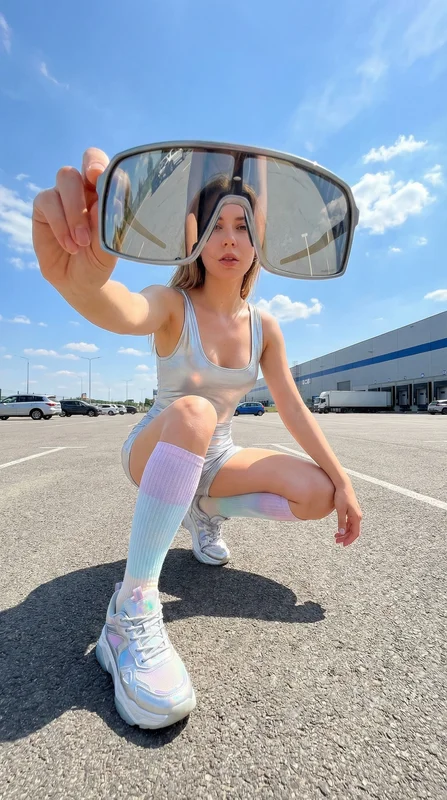
Source photo (first frame)
Result — Kling 2.6 · 10s · audio
Why this works. Kling 2.6 is trained heavily on dance/body motion. A three-word prompt gives it the creative latitude to generate full-body rhythmic movement without locking into one specific action. For any generic "person moves" prompt, start minimal — if the output is too random, add specificity (direction, speed, body part focus) one descriptor at a time.
This pattern is the baseline: Dance at parking lot in our template library. Swap the source photo for your AI influencer, keep the same prompt — identical result pattern with your character's face.
2. How do you make your AI influencer speak on camera?
Direct answer: Use WAN 2.6 with a detailed prompt that specifies the exact line spoken, plus handheld camera language. WAN's prompt adherence handles speech + body motion in one clip.
Prompt used:
Same sweaty woman in a black sports bra sitting on a yoga mat in a brick
fitness studio after a workout. Handheld selfie-style framing with her arm
extended toward camera, natural micro-jitter, no gimbal glide. She exhales,
lifts her free hand and tucks wet hair behind her ear, then looks straight
into the camera and speaks clearly with a soft smile: "That was a really
good workout today." After the line, she gives a small nod and relaxes her
shoulders. 24fps, shutter 1/48, mild grain, natural skin texture. No face
morphing, no smoothing, no text.
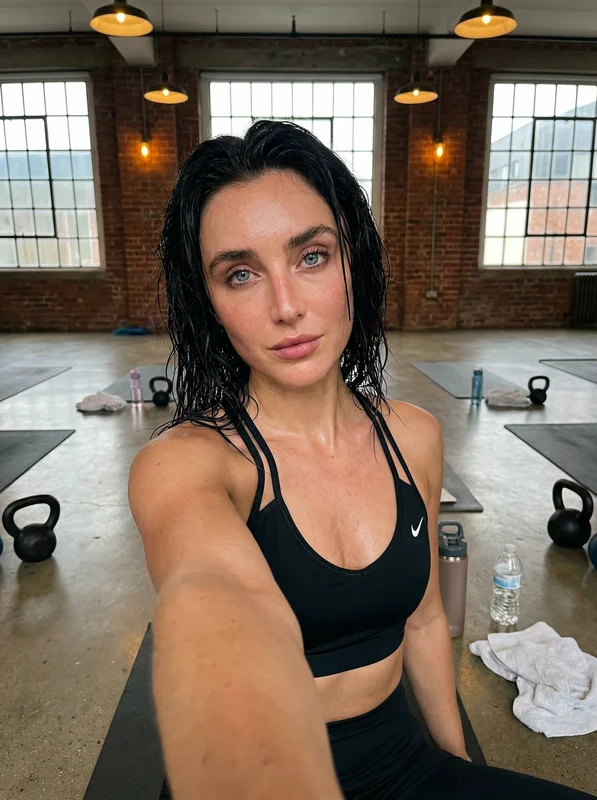
Source photo (first frame)
Result — WAN 2.6 · 10s
Why this works. Talking-head content needs three things the prompt explicitly provides: (1) the exact line to lip-sync, quoted verbatim, (2) handheld camera feel so it looks self-filmed not studio, (3) micro-actions between the line (hair tuck, exhale, nod) so the clip feels alive on either side of the spoken moment. WAN 2.6 handles this chain reliably; Kling models tend to drop one of the three.
Use this pattern for workout recap posts, morning routines, reaction Reels — any content where your influencer talks directly to the audience. Template reference: After workout.
3. How do you capture beauty or fashion micro-motion?
Direct answer: For slow, deliberate motion at the face (makeup application, jewelry adjustment, hair touch), use Kling 2.1 with descriptive gesture language and "slight handheld sway, no zoom" — removing camera motion forces the model to put all its attention on the character.
Prompt used:
Same scene at the mirror, soft natural light. She applies the lip liner to
the center of the lower lip, filling slightly inward with small controlled
strokes. She pulls the pencil away, presses her lips together once (a gentle
"smack") to blend, then relaxes into a subtle satisfied expression while
maintaining eye contact with her reflection. Camera: slight handheld sway,
no zoom. 24fps, shutter 1/48, mild grain. No morphing, no smoothing, no text.
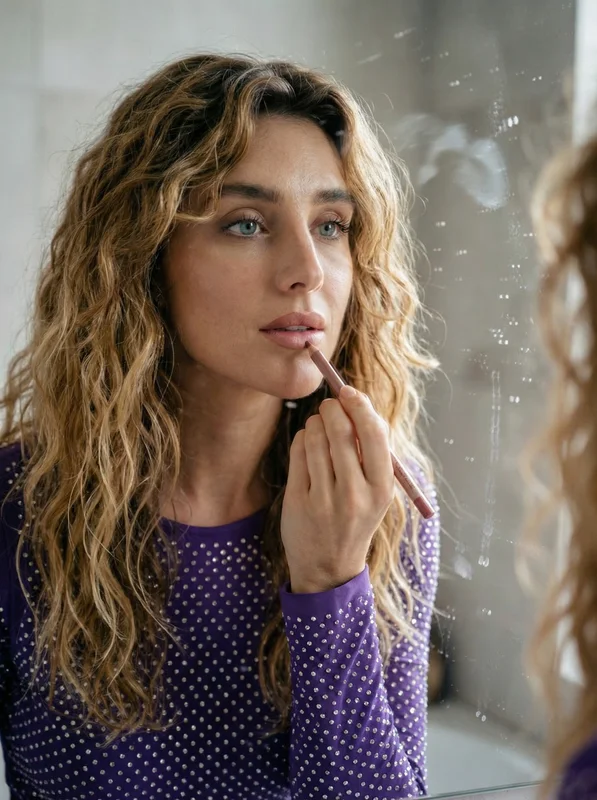
Source photo (first frame)
Result — Kling 2.1 · 10s
Why this works. Beauty content is judged frame-by-frame — any wobble, any soft-focus drift kills the shot. By specifying "no zoom" and limiting motion to "slight handheld sway", you keep the camera almost static and let Kling 2.1 render sharp skin texture, stable eyes, and hand-to-lip coordination. The explicit sequence (apply → pull away → press → relax) gives the model a 4-beat rhythm that reads as a real tutorial pace, not a generic single motion.
Same pattern works for mascara, hair styling, skincare routines, fashion adjustments. Reference: Applying lip contour.
4. How do you add cinematic atmosphere to a portrait?
Direct answer: Combine environmental motion (rain, wind, neon bokeh) with a single intimate gesture and a slow 10–15 degree camera arc. The atmosphere carries the mood; the gesture carries the character.
Prompt used:
Rainy night close-up, same red-haired woman, wet lashes, eyeliner intact,
neon bokeh behind. A large raindrop sits on her upper lash line; she gently
wipes it with her fingertip, then brings that finger near her lips in a soft
"shh" gesture while holding intense eye contact. Camera: handheld portrait,
slow arc 10–15 degrees to the right, natural micro sway; focus pulls from
fingertip to eyes. 24fps, shutter 1/48, mild grain, realistic rain and skin
texture. No warping, no floating camera, no text.
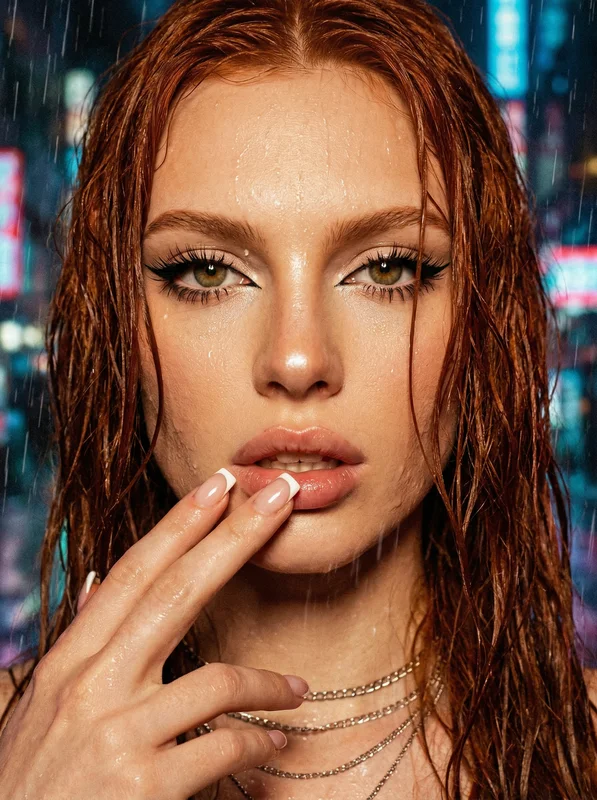
Source photo (first frame)
Result — Kling 2.1 · 10s
Why this works. Cinematic portraits live or die on three details: eye focus, ambient motion (the rain is doing most of the "this is video not a still" work), and one deliberate gesture. The prompt names all three, plus technical specs (24fps, shutter 1/48) that push Kling toward a film-grade look rather than smooth-motion smartphone aesthetic. Reference: Rainy night close-up.
What makes the source photo work or break?
Before any prompt, the source photo decides 70% of output quality. Rules that hold across all four examples above:
- 1024×1024 minimum resolution. Below this, the engine has too little facial detail to animate cleanly and you get frame-to-frame flicker.
- Sharp eyes and lips. Motion models spend most of their processing attention on the face. Blurry eyes = wandering, distorted eyes in the video.
- Implied motion in the pose. A figure with weight shifted to one leg, hair mid-drift, or a hand already raised animates better than a perfectly symmetrical standing pose.
- Clear subject/background separation. Flat backgrounds or clean bokeh animate cleanly. Busy backgrounds with human-sized objects confuse the model into animating them too.
- Face takes up 20–40% of frame. Too wide and the face gets mangled; too close and the model has nothing to anchor body motion against.
If you're generating source photos on ZenCreator, PhotoShoot keeps your influencer's face consistent across 40+ themed categories — that's where most creators sources come from. Combined with Face Swap, you get identity lock across every clip you generate.
Writing prompts that work across engines
Three rules that hold across Kling 2.1, Kling 2.6, and WAN 2.6:
- Lead with the subject, then the motion, then the environment. "A woman turns to camera, soft smile, natural window light" beats "Natural window light on woman turning to camera". The model anchors on whatever comes first.
- One camera intent per clip. Pick one: static, handheld sway, slow arc, dolly-in. Stacking two camera moves confuses the engine and you get drift.
- Explicit technical specs for cinematic looks. Adding
24fps, shutter 1/48, mild grainpushes Kling and WAN toward a film aesthetic. Leave them out for smooth-motion social-ready output.
For anything beyond these, start with the minimal prompt, review the result, add one descriptor at a time. The urge to write a 200-word prompt always makes the output worse.
How long does an Image-to-Video clip take?
Generation times measured on a 5-second 720p clip:
| Engine | Typical time | Best for |
|---|---|---|
| Kling 2.1 | ~30s | Beauty, fashion, micro-motion portraits |
| Kling 2.6 | ~45s | Dance, active body motion, multi-action prompts |
| WAN 2.6 | ~45–60s | Talking-head, unrestricted content, complex sequences |
| WAN 2.6 Flash | ~20–30s | Fast drafting before committing to full 2.6 |
Batch generation runs in parallel — if you queue 10 clips at once, you wait for one clip's time, not ten.
Image-to-Video Templates Ready to Use
Pre-tuned templates — prompt is already loaded, just upload your character photo and hit generate.
FAQ
What's the longest clip I can generate?
10 seconds per run on Kling 2.6 and WAN 2.6. For longer content, generate multiple 5–10 second clips with the same source and prompt style, then cut them in a video editor.
Can I animate a phone photo or does it have to be AI-generated?
Any raster image works — phone photos, DSLR shots, AI generations, scanned prints. Resolution and face clarity rules apply regardless of source. For AI influencer consistency, most creators use AI-generated sources because they've already Face-Swapped the identity onto them.
Which engine has audio?
Kling 2.6 generates audio when generate_audio is enabled — the Dance example on this page has real stereo AAC audio baked in. WAN 2.6 and Kling 2.1 currently produce silent clips; add a soundtrack in post if needed.
Can I get exact lipsync from this tool, or do I need a separate Lipsync tool?
WAN 2.6 handles lipsync in-clip when the prompt quotes the exact line (see the "After workout" example). For longer dialogues or when you want precise control over audio timing, use the dedicated Lipsync tool — generate the video silently first, then add voiced lipsync on top.
Why do my hands look broken in the result?
Hands are still the weakest part of AI video. Frame shots so hands are out of frame, behind the body, or in simple resting positions. Don't prompt for "complex finger gestures" — you'll get 5 fingers half the time and 7 the other half. If the clip is 90% right but the hands are bad, crop them out in post.
Can the tool keep my influencer's exact face across clips?
Yes — the first frame of every output is derived from your source photo. If your source has a Face-Swapped character, every clip keeps that face. Run all clips from the same Face Swap template to lock identity across a full Reel series.
When should I pick WAN over Kling for my influencer?
WAN 2.6 when the clip has speech, unrestricted content, or a multi-action sequence (walk → turn → speak). Kling 2.6 for cleanest body motion and dance. Kling 2.1 for beauty/fashion micro-motion. Full comparison: WAN 2.2 vs 2.5 vs 2.6 guide.
See also: