FreeGen vs ZenCreator: Free AI Image Generators Compared (2026)
FreeGen.app vs ZenCreator side-by-side comparison. Models, tools, resolution, video generation, and content freedom compared for 2026.
Looking for a free AI image generator in 2026? FreeGen.app and ZenCreator both offer free image generation, but they solve completely different problems. FreeGen is a zero-signup, single-purpose image generator. ZenCreator is a 12-tool creative platform with character consistency, video generation, and social publishing.
This comparison helps you decide which one fits your workflow.
Quick Summary: FreeGen vs ZenCreator
| Feature | ZenCreator | FreeGen |
|---|---|---|
| Credits | Yes (signup required) | Yes (no signup) |
| AI Model | Multiple integrated per tool | Z-Image Turbo |
| Video Generation | 3 engines (Kling 1.6, 2.0, WAN) | None (external link) |
| Face Consistency | Identity Lock across all tools | None |
| Face Swapping | Images AND video | None |
| Batch Generation | Up to 100+ images | One at a time |
| Max Resolution | Up to 4K (via Upscaler) | 1024×768 |
| Watermark | No watermark | No watermark |
| Social Publishing | Direct to Instagram, TikTok, YouTube | Manual download |
| Aspect Ratios | Flexible (1:1, 3:4, 9:16, custom) | 5 options |
| Total Tools | 12 specialized tools | 1 (image generation) |
| Best For | Production content workflows | Quick one-off images |
FreeGen Review: What We Found
After testing FreeGen.app, here's our honest assessment:
Strengths:
- Genuinely free with unlimited generations — no hidden paywalls
- Zero signup friction — type a prompt and generate immediately
- Fast generation (under 10 seconds via WebSocket delivery)
- Clean, minimal interface that's impossible to get confused by
- No watermark on outputs
- Commercial use allowed
Limitations:
- Fixed 1024×768 resolution — cannot generate higher without a separate upscaler
- No video generation — links to an external service (Deep Dream Generator)
- No face swap or character consistency — every image is a different person
- One image at a time — no batch processing
- No editing tools — no inpainting, outpainting, or composition
- No social media optimization — manual download only
- Single model only — Z-Image Turbo with no alternative options
Bottom line: FreeGen is the fastest path from "I want an AI image" to having one. But it stops there. No video, no consistency, no pipeline.
What is FreeGen?
FreeGen.app is a zero-signup AI image generator built by Aifnet that runs on the Z-Image Turbo model. Its entire value proposition is simplicity — no account, no credits, no waiting.
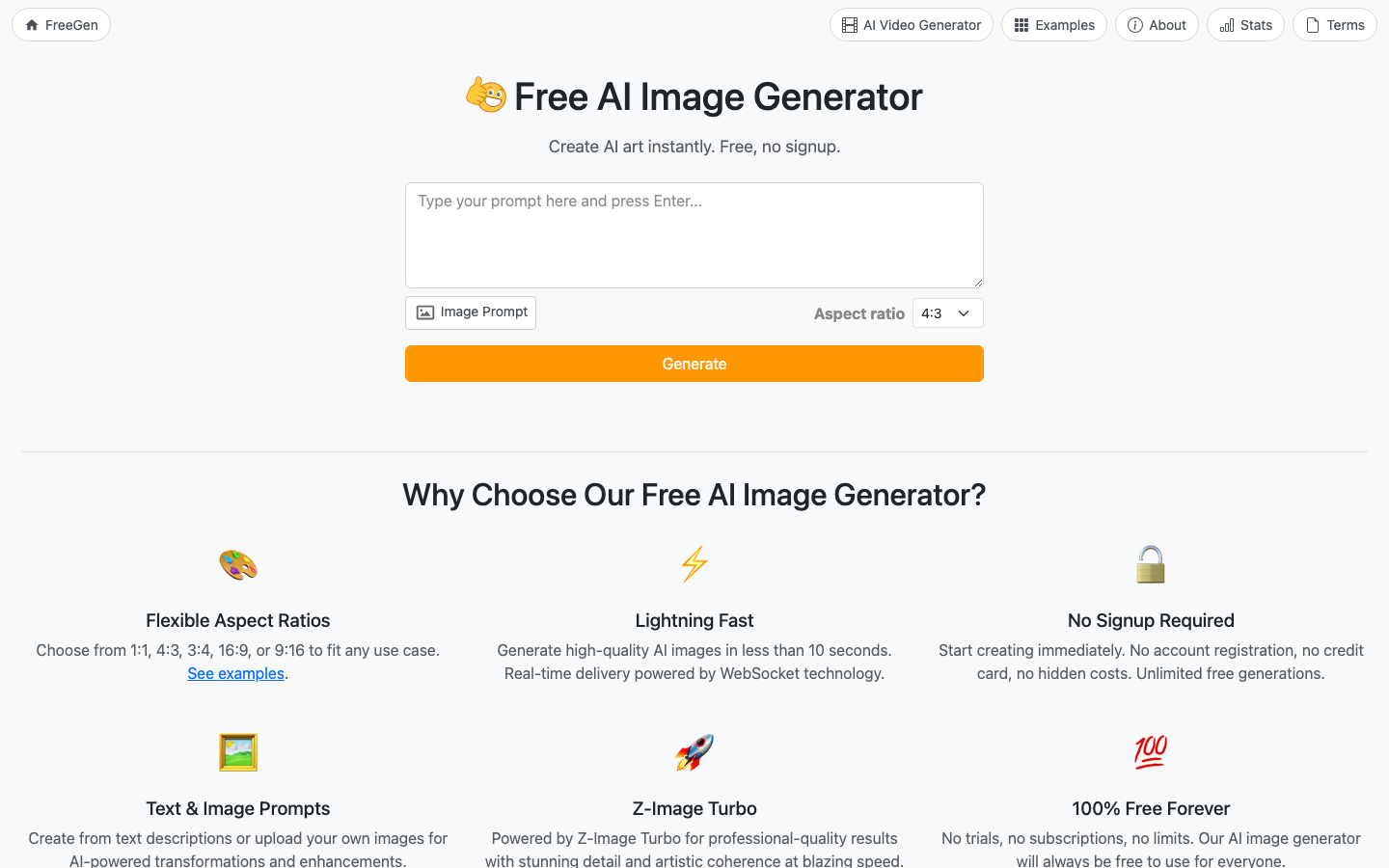
Key features of FreeGen:
- Z-Image Turbo Model — Fast generation with decent prompt adherence
- Text-to-Image — Generate from text descriptions
- Image-to-Image — Upload reference images for transformation
- 5 Aspect Ratios — 1:1, 4:3, 3:4, 16:9, 9:16
- No Signup Required — Generate immediately without an account
- Unlimited Free Generations — No credit limits or daily caps
- Commercial Use — Generated images can be used commercially
Here's what the About page says about FreeGen's capabilities:
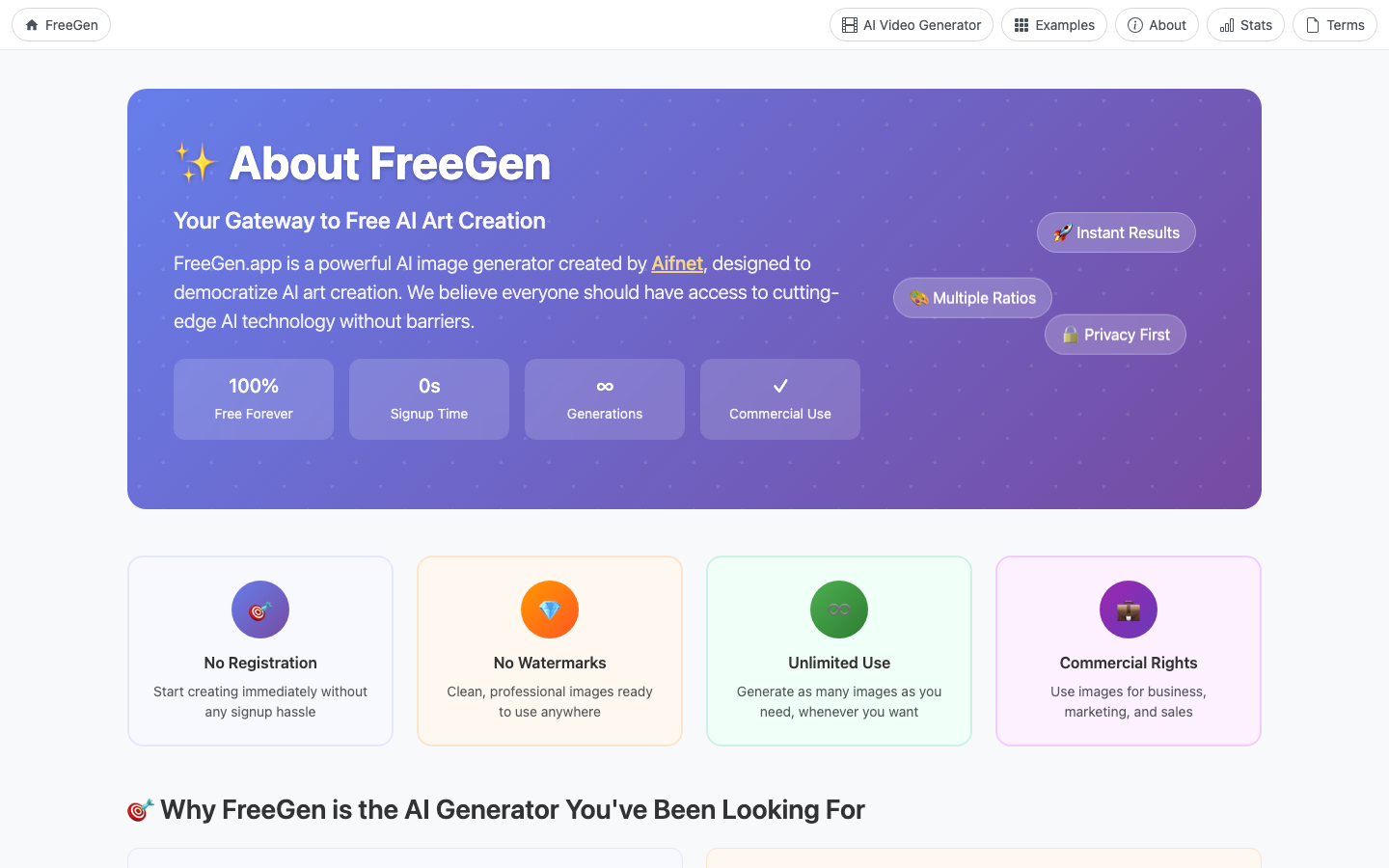
FreeGen's limitations:
- 1024×768 max resolution — Low by 2026 standards
- No video generation — Image only (links to external service for video)
- No face technology — No face swap, no consistency, no face generator
- No editing — No inpainting, outpainting, or post-processing
- No batch processing — One image per generation
- No social publishing — Manual download required
- Single model — No model switching or selection
What is ZenCreator?
ZenCreator is a creator-focused AI content platform with 12 specialized tools designed for consistent AI character content and social media production.
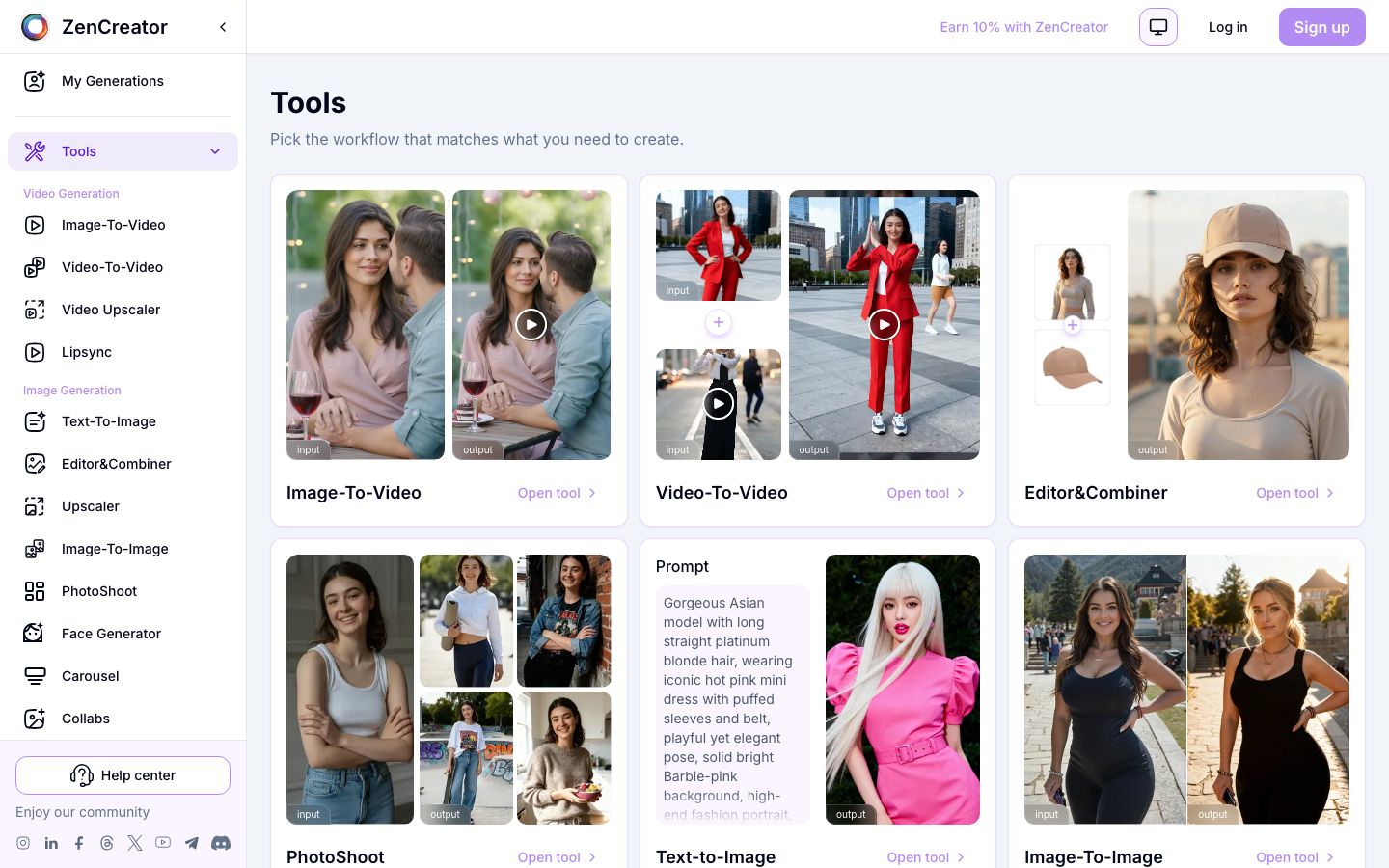
Key features of ZenCreator:
- 12 Specialized Tools — Face Generator, Face Swap, PhotoShoot, Text-to-Image, Image-to-Image, Image-to-Video, Video-to-Video, Upscaler, Variations, Editor & Combiner, Collabs, Lipsync
- Character Consistency — Identity Lock preserves the same face across all tools
- 3 Video Engines — Kling 1.6 (fast), Kling 2.0 (photoreal), WAN (unrestricted)
- Batch Generation — 100+ images at once
- Up to 4K Resolution — Via Upscaler with Face-Safe mode
- Social Publishing — Direct post to Instagram, TikTok, YouTube, Facebook, Threads
- No Watermark — All tiers including free
Feature-by-Feature Comparison
1. AI Image Generation
FreeGen:
- Z-Image Turbo model (single model, no alternatives)
- Text-to-Image and Image-to-Image
- Fixed 1024×768 resolution
- Generation in under 10 seconds
- No style controls beyond the prompt
ZenCreator:
- Multiple models integrated per tool
- Text-to-Image, Image-to-Image, PhotoShoot (40+ categories), Editor & Combiner
- Up to 4K via Upscaler
- Style controlled via prompt + model selection
- Batch generation of 100+ images
Winner: ZenCreator — Deeper tools, higher resolution, batch processing. FreeGen wins on speed-to-first-image.
2. Video Generation
FreeGen:
- No built-in video generation
- Links to Deep Dream Generator for video (external service)
- No image-to-video conversion
- No lipsync or animation
ZenCreator:
- Image-to-Video with 3 engines (Kling 1.6, Kling 2.0, WAN)
- Video-to-Video motion transfer
- Lipsync (talking-head from photo + audio)
- Social media export presets
Winner: ZenCreator — Complete video pipeline vs. no video capability.
3. Face Technology & Character Consistency
FreeGen:
- No face technology at all
- Every generation is a different person
- No face swap, no identity lock
- Impossible to maintain a character across images
ZenCreator:
- Face Generator for creating characters
- Face Swap on images AND videos
- PhotoShoot with Identity Lock (40+ themed categories)
- Collabs for multi-character scenes
- Same face across all 12 tools
Winner: ZenCreator — FreeGen has zero character consistency features.
4. Resolution & Output Quality
FreeGen:
- Fixed 1024×768 resolution
- Separate external upscaler tool for enhancement
- No face-safe upscaling
ZenCreator:
- Flexible base resolution
- Up to 4x upscaling with Face-Safe mode (preserves skin texture)
- Multiple output formats
Winner: ZenCreator — Higher resolution with intelligent upscaling.
5. Pricing & Accessibility
FreeGen:
- 100% free, forever
- No signup required
- No credit card needed
- No daily limits
- No watermark
- Ad-supported model
ZenCreator:
- $19.99 pay-once starter pack (200 credits, never expire)
- Email or Google signup required, no credit card
- No watermark on any tier
- Scalable paid plans
Winner: FreeGen — Zero friction to first image. But ZenCreator's starter plan ($19.99) unlocks 12 tools vs. 1.
6. Social Media Workflow
FreeGen:
- Manual download only
- No platform-specific presets
- No publishing integration
- User handles all formatting
ZenCreator:
- Instagram presets (1:1, 4:5, 9:16)
- TikTok (9:16), YouTube (16:9)
- Direct publishing integration
- Batch export
Winner: ZenCreator — Built for creators who publish regularly.
When to Choose FreeGen
FreeGen is the better choice if you:
- Need one AI image right now with zero friction
- Don't want to create an account anywhere
- Use AI image generation occasionally, not daily
- 1024×768 resolution is sufficient for your use case
- Don't need video, face swap, or character consistency
- Want to experiment before committing to any platform
When to Choose ZenCreator
ZenCreator is the better choice if you:
- Build AI influencer accounts or brand personas
- Need video generation (Image-to-Video, Lipsync, Video-to-Video)
- Produce content in batches for social media accounts
- Need face consistency across all your content
- Want watermark-free, high-resolution output ready for publishing
- Publish directly to Instagram, TikTok, YouTube
- Create multi-character content (Collabs tool)
- Need talking-head videos (Lipsync)
Use Case Scenarios
Scenario 1: Quick Blog Post Image
Need: One image for a blog post, right now, no account.
Winner: FreeGen — Zero friction, instant result.
Scenario 2: Daily AI Influencer Posts
Need: 2-3 posts per day with the same AI character on Instagram.
Winner: ZenCreator — Identity Lock, batch generation, direct publishing.
Scenario 3: TikTok Video Content
Need: Create short videos with AI characters, talking heads, dance videos.
Winner: ZenCreator — FreeGen has no video capability at all.
Scenario 4: Testing AI Image Generation
Need: Try different prompts and styles to see what AI can do.
Winner: FreeGen — Unlimited, free, instant. Perfect for experimentation.
Scenario 5: Commercial Product Shots
Need: High-resolution product images or lifestyle photos for marketing.
Winner: ZenCreator — 4K upscaling, PhotoShoot categories, commercial licensing.
Migration Guide: Growing from FreeGen to ZenCreator
Many creators start with FreeGen for experimentation and graduate to ZenCreator when they need a production pipeline. Here's how to transition:
Step 1: Sign Up for ZenCreator
Visit app.zencreator.pro — free account, no watermark from day one.
Step 2: Create Your Character
Use Face Generator to build your AI persona. This face will stay consistent across everything you create.
Step 3: Generate Production Content
Use PhotoShoot for themed photo sets (40+ categories), or Text-to-Image for custom scenes. Batch-generate 100+ images in one session.
Step 4: Add Video
Convert your best images to video. Choose Kling 1.6 for speed, Kling 2.0 for photoreal quality, or WAN for full creative freedom. Add Lipsync for talking heads.
Step 5: Publish
Use social media presets and publish directly to Instagram, TikTok, and YouTube — no manual downloading or resizing.
Frequently Asked Questions
Is FreeGen better than ZenCreator for beginners?
For absolute beginners who want one image — yes, FreeGen is simpler (no signup, instant result). For beginners who want to build something with AI (influencer accounts, content series), ZenCreator's guided tools are more productive despite the signup step.
Does FreeGen have content restrictions?
FreeGen positions itself as a "no restrictions" generator. ZenCreator offers unrestricted generation across its entire 12-tool pipeline including video, face swap, and multi-character content.
Can I create videos with FreeGen?
Not directly. FreeGen links to an external service (Deep Dream Generator) for video. ZenCreator has 3 built-in video engines plus Lipsync.
Which generates images faster?
FreeGen generates in under 10 seconds with no queue or signup. ZenCreator's time-to-first-image is longer (signup + generation) but comparable for single images once set up.
What resolution does FreeGen output?
1024×768 pixels. ZenCreator starts at similar resolution but offers up to 4x upscaling with Face-Safe mode for print-quality output.
Can I use FreeGen images commercially?
Yes, FreeGen allows commercial use. ZenCreator also allows commercial use with documented licensing.
Conclusion: Starter Tool vs Production Platform
FreeGen is the best way to try AI image generation with zero commitment. It does one thing well: instant, free, no-signup image generation.
ZenCreator is the platform you grow into when you need character consistency, video production, batch content, and direct social publishing.
Need one quick image? FreeGen.app is excellent.
Building a content workflow? Start with ZenCreator — 12 tools, no watermark, consistent characters.
More Comparisons
- Media.io vs ZenCreator — Broad creative toolkit comparison
- Raphael AI vs ZenCreator — Multi-model routing comparison
- Mage.Space vs ZenCreator — 160+ AI models vs creator pipeline
- Perchance AI vs ZenCreator — Free AI image generator comparison
Related Reading
- Unrestricted AI Generator — Create AI content without limitations
- AI Image Generator No Restrictions — Unrestricted AI image generation
- AI Influencer Generator — Build AI influencers for Instagram and TikTok
- Uncensored AI Video Generator — Generate unrestricted AI videos