Raphael AI vs ZenCreator: AI Image Generators Compared (2026)
Raphael AI vs ZenCreator side-by-side comparison. Multi-model routing, face swap, video generation, content freedom, and quality compared for 2026.

Raphael AI has grown to 3 million monthly users by offering free, no-signup image generation with intelligent model routing. ZenCreator is a 12-tool creative platform built for AI influencer workflows with character consistency, video generation, and social publishing. Both are free to start — but they're built for very different creators.
This comparison breaks down the real differences so you can pick the right tool for your needs.
Quick Summary: Raphael AI vs ZenCreator
| Feature | ZenCreator | Raphael AI |
|---|---|---|
| Credits | Yes (signup required) | Yes (no signup, unlimited) |
| AI Models | Multiple integrated per tool | Z-Image, Flux 2, Qwen-Image, Nano Banana Pro (auto-routed) |
| Video Generation | 3 engines + Lipsync | Listed as "NEW" — limited documentation |
| Face Consistency | Identity Lock across all tools | None |
| Face Swapping | Images AND video | Available (basic) |
| Lipsync | Photo + audio → talking head | Listed (basic) |
| Batch Generation | Up to 100+ images | One at a time |
| Watermark | No watermark | Watermark on free images |
| Content Freedom | Unrestricted across all tools | "Standard content guidelines" enforced |
| Resolution | Up to 4K (via Upscaler) | ~1024px |
| Social Publishing | Direct to Instagram, TikTok, YouTube | Manual download |
| Style Presets | Via prompt + model | Sketch, Plushie, Doodle, Pop Art, and more |
| Users | Growing | 3M+ monthly active |
| Best For | AI influencer production pipelines | Quick casual image generation |
Raphael AI Review: What We Found
After testing Raphael AI's platform, here's our honest assessment:
Strengths:
- Intelligent multi-model routing — the system picks from Z-Image, Flux 2, Qwen-Image, and Nano Banana Pro per prompt
- Zero signup, unlimited generations, completely free
- Style presets (Sketch, Plushie, Doodle, Pop Art) for quick creative experiments
- Zero data retention policy — prompts and images aren't stored
- 3M+ monthly users — proven at scale
- Negative prompt support for more control
Limitations:
- Watermarks on free images — limits publishability without post-processing
- ~1024px resolution — low for serious production work
- "Standard content guidelines" enforced — not truly unrestricted, some prompts are filtered
- No saved history — generations disappear after closing the tab
- Basic face swap and lipsync — listed but documentation is limited
- No character consistency — no identity lock or face persistence across generations
- No batch generation — one image at a time
- No social media publishing — manual download only
- No video documentation — "AI Video Generator" listed as NEW with limited details
Bottom line: Raphael AI is excellent for casual, free image generation with smart model routing. But the watermarks, content guidelines, and lack of production tools make it a starting point, not a production platform.
What is Raphael AI?
Raphael AI is a free, no-signup AI image generator that uses intelligent routing to automatically pick the best model for each prompt. It has grown rapidly to 3 million monthly active users generating approximately 1,530 images per minute.
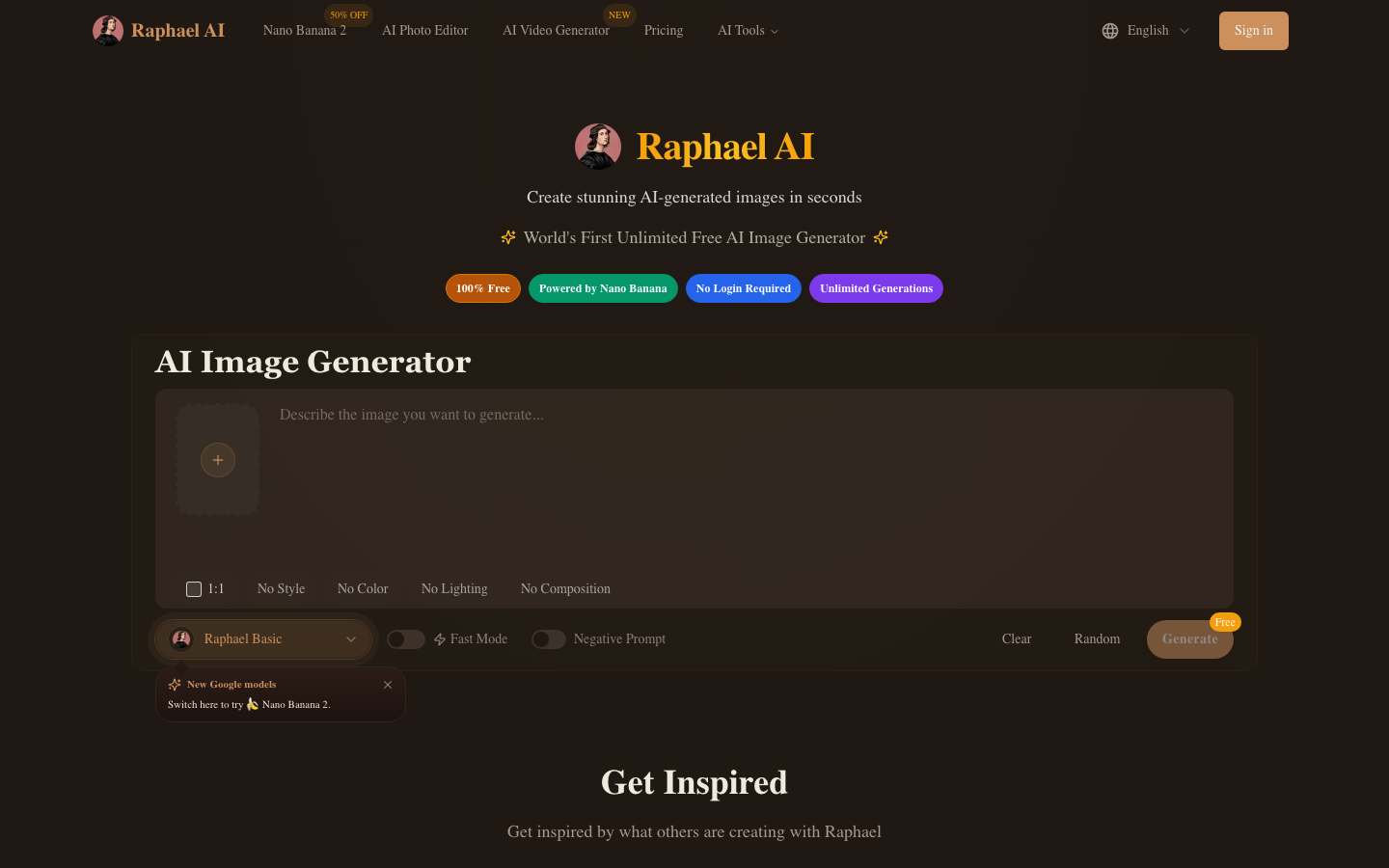
Key features of Raphael AI:
- Multi-Model Routing — Automatically selects from Z-Image, Flux 2, Qwen-Image, Nano Banana Pro based on prompt content
- Style Presets — Sketch, Plushie, Doodle, Pop Art, and more
- No Signup Required — Generate immediately without account
- Unlimited Generations — No daily caps or credit limits
- Negative Prompts — Control what not to generate
- AI Photo Editor — Basic image editing
- Expand Image — AI-powered uncropping
- Face Swap — Available (basic implementation)
- AI Lip Sync Video — Listed feature
- Zero Data Retention — No storage of prompts or generated images
Here's a closer look at Raphael AI's full interface with model selection and style presets:

Raphael AI's limitations:
- Watermarks on free images — Limits direct use for publishing
- ~1024px resolution — No native high-resolution option
- "Standard content guidelines" — Not truly unrestricted
- No character consistency — Different face every generation
- No batch generation — Single images only
- No history or saved projects — Ephemeral generations
- No social publishing — Manual download required
- Limited video documentation — Video generator listed as "NEW" without details
What is ZenCreator?
ZenCreator is a creator-focused AI content platform with 12 specialized tools, designed for consistent AI character content and social media production.
Key features of ZenCreator:
- 12 Specialized Tools — Face Generator, Face Swap, PhotoShoot, Text-to-Image, Image-to-Image, Image-to-Video, Video-to-Video, Upscaler, Variations, Editor & Combiner, Collabs, Lipsync
- Character Consistency — Identity Lock preserves the same face across all tools and outputs
- 3 Video Engines — Kling 1.6 (fast/stylized), Kling 2.0 (photoreal), WAN (most permissive)
- Face Swap — Works on images AND videos with lighting/expression matching
- Batch Generation — 100+ images at once
- Up to 4K Resolution — Via Upscaler with Face-Safe mode
- Social Publishing — Direct post to Instagram, TikTok, YouTube, Facebook, Threads
- No Watermark — All tiers including free
- Unrestricted — No content guidelines, no prompt filtering
Feature-by-Feature Comparison
1. AI Models & Image Quality
Raphael AI:
- Intelligent routing across 4 models (Z-Image, Flux 2, Qwen-Image, Nano Banana Pro)
- System auto-selects best model per prompt
- User doesn't choose — convenient but less control
- Rated 4.9/5 by 25,000+ users
- ~1024px output resolution
ZenCreator:
- Multiple models integrated per tool
- Models optimized for specific use cases (photoshoot vs. creative vs. editorial)
- Up to 4K via Upscaler with Face-Safe mode
- Quality tuned for social media publishing
Winner: Tie — Raphael AI's multi-model routing is clever. ZenCreator's per-tool optimization is deeper. Both produce quality images.
2. Video Generation
Raphael AI:
- "AI Video Generator" listed as NEW in navigation
- Limited documentation on capabilities
- No detailed specs on video models or quality
- Appears to be early-stage feature
ZenCreator:
- 3 mature video engines: Kling 1.6 (fast), Kling 2.0 (photoreal), WAN (unrestricted)
- Image-to-Video conversion
- Video-to-Video motion transfer
- Lipsync (talking-head from photo + audio)
- Social media export presets
Winner: ZenCreator — Mature, documented video pipeline vs. early-stage feature listing.
3. Face Technology & Character Consistency
Raphael AI:
- Face Swap available (basic)
- AI Lip Sync Video listed
- No character consistency or identity lock
- No face generator
- No multi-character tool
- Each generation is a different person
ZenCreator:
- Face Generator — create characters from scratch
- Face Swap — images AND videos, with lighting/expression matching
- PhotoShoot — 40+ themed categories with Identity Lock
- Collabs — multi-character scenes with consistent faces
- Lipsync — proven, documented, integrated with video pipeline
- Same character across all 12 tools
Winner: ZenCreator — Both have face swap, but ZenCreator's is deeper (video support, identity lock, multi-character). Raphael AI's implementation lacks documentation.
4. Content Freedom
Raphael AI:
- Enforces "standard content guidelines"
- Some prompts are filtered or rejected
- Not truly unrestricted generation
ZenCreator:
- Unrestricted across all 12 tools
- No prompt rewriting or filtering
- Content freedom extends through the full pipeline: generate → edit → animate → face-swap → publish
- Published content policy and GDPR compliance
Winner: ZenCreator — Genuinely unrestricted vs. content-filtered. For creative freedom this is a significant difference.
5. Watermark & Output
Raphael AI:
- Watermark on free images
- ~1024px max resolution
- No saved history — close the tab, lose the image
- Zero data retention (privacy benefit, but no persistence)
ZenCreator:
- No watermark on any output, any tier
- Up to 4K via Upscaler with Face-Safe mode
- Files stored in your account
- Commercial-ready from day one
Winner: ZenCreator — Watermark-free, higher resolution, persistent storage.
6. Pricing & Accessibility
Raphael AI:
- Completely free, unlimited, no signup
- Zero friction to first image
- No paid plans (entirely free model)
- No credit card ever
ZenCreator:
- Starter plan $19.99 for 200 credits (never expire)
- Signup required (email or Google)
- Scalable paid plans
- No watermark on any tier
Winner: Raphael AI — Zero friction wins for casual use. But ZenCreator's starter plan ($19.99) unlocks 12 tools vs. primarily 1.
7. Social Media Workflow
Raphael AI:
- Manual download only
- No export presets
- No publishing integration
- No batch processing
ZenCreator:
- Instagram presets (1:1, 4:5, 9:16)
- TikTok (9:16), YouTube (16:9)
- Direct publishing integration
- Batch export
Winner: ZenCreator — Purpose-built for social media creators.
8. Style Controls
Raphael AI:
- Style presets: Sketch, Plushie, Doodle, Pop Art, and more
- Negative prompt support
- Aspect ratio controls
- Smart model routing picks style-appropriate model
ZenCreator:
- Style via prompt + model selection
- PhotoShoot categories (40+ themes: Cozy, Studio, Beach, Glamour, etc.)
- Reference-based generation
- Less preset-driven, more pipeline-driven
Winner: Raphael AI — More accessible style presets for quick creative experiments.
When to Choose Raphael AI
Raphael AI is the better choice if you:
- Want instant image generation with zero signup
- Use AI images casually — not daily production
- Like style presets (Sketch, Plushie, Pop Art) for quick experiments
- Value privacy (zero data retention)
- Don't need video generation, face swap on video, or lipsync
- Are comfortable with watermarked outputs and content guidelines
- Want to try AI art without any commitment
When to Choose ZenCreator
ZenCreator is the better choice if you:
- Build AI influencer accounts or brand personas (character consistency essential)
- Need unrestricted content freedom (no content guidelines or prompt filtering)
- Need watermark-free output from day one
- Create content in batches for social media (100+ images at once)
- Want a complete pipeline: generate → edit → animate → face-swap → publish
- Need video generation with mature engines (Kling 1.6, 2.0, WAN)
- Create talking-head content (Lipsync)
- Publish directly to Instagram, TikTok, YouTube
- Create multi-character content (Collabs)
Use Case Scenarios
Scenario 1: Quick Social Media Post
Need: One image for a tweet or story, right now.
Winner: Raphael AI — Zero signup, instant generation.
Scenario 2: AI Influencer Instagram Account
Need: Consistent character across 3+ daily posts with occasional Reels.
Winner: ZenCreator — Identity Lock, batch generation, video engines, direct publishing. Raphael AI can't maintain a character.
Scenario 3: Exploring AI Art Styles
Need: Try different artistic styles — anime, sketch, pop art, plushie.
Winner: Raphael AI — Style presets + multi-model routing make exploration easy.
Scenario 4: AI Couple / Group Content
Need: Multiple AI characters in the same scene with consistent faces.
Winner: ZenCreator — Collabs tool. Raphael AI has no multi-character capability.
Scenario 5: Talking Head Video for YouTube
Need: AI character speaking to camera with synced lip movement.
Winner: ZenCreator — Mature Lipsync tool. Raphael AI lists lipsync but documentation is thin.
Scenario 6: Unrestricted Creative Content
Need: Generate content without any content filters or prompt restrictions.
Winner: ZenCreator — Genuinely unrestricted. Raphael AI enforces "standard content guidelines."
Migration Guide: Growing from Raphael AI to ZenCreator
Step 1: Sign Up for ZenCreator
Visit app.zencreator.pro — free account, no watermark.
Step 2: Create Your Character
Use Face Generator to build your AI persona. Unlike Raphael AI, this face persists across every tool and every session.
Step 3: Build Content with Consistency
Use PhotoShoot (40+ themed categories with Identity Lock), Text-to-Image for custom scenes, and Face Swap to apply your character to any generated image or video.
Step 4: Add Video and Lipsync
Convert your best images to video (Kling 1.6/2.0 or WAN). Add Lipsync for talking-head content. Create Collabs for multi-character scenes.
Step 5: Publish Without Watermarks
Export with social media presets (Instagram, TikTok, YouTube) and publish directly — no downloading, no watermark removal, no manual resizing.
Frequently Asked Questions
Is Raphael AI better than ZenCreator for image quality?
Raphael AI's multi-model routing (Z-Image, Flux 2, Qwen-Image, Nano Banana Pro) produces solid images with auto-model-selection. ZenCreator's image quality is comparable with deeper per-tool integration. Single-image quality is close; production quality is higher on ZenCreator due to the pipeline (generate → upscale 4x → face swap → animate).
Does Raphael AI support video generation?
Raphael AI lists an "AI Video Generator" as NEW, but documentation is limited. ZenCreator has 3 mature video engines (Kling 1.6, Kling 2.0, WAN) plus Lipsync, Video-to-Video, and direct publishing.
Can I use Raphael AI for unrestricted content?
No. Raphael AI enforces "standard content guidelines" — some prompts are filtered. ZenCreator offers unrestricted generation across all 12 tools without prompt filtering.
Which has better face swap?
Both platforms offer face swap. ZenCreator's works on images AND videos, preserves lighting and expression, and integrates with Identity Lock for consistent characters. Raphael AI's face swap is available but less documented.
Is Raphael AI really free?
Yes — unlimited, no signup. But free images include watermarks and are limited to ~1024px. ZenCreator requires signup but provides watermark-free output at higher resolution.
Is Raphael AI safe and private?
Raphael AI advertises zero data retention — prompts and images aren't stored. ZenCreator publishes a full content policy and GDPR compliance documentation. Both prioritize privacy differently.
Which platform has more AI models?
Raphael AI routes across 4 models automatically. ZenCreator integrates multiple models per tool but doesn't expose model selection — the tool picks the optimal model per use case. More models visible ≠ better results.
Can I maintain the same character across generations on Raphael AI?
No. Raphael AI has no character consistency features. Every generation produces a different face. ZenCreator's Identity Lock maintains the same character across all 12 tools.
Conclusion: Casual Generator vs Production Platform
Raphael AI is the best free, no-signup image generator with smart model routing and fun style presets. It's perfect for experimentation and casual use.
ZenCreator is the platform you need when casual isn't enough — character consistency, video production, unrestricted content, batch generation, and direct publishing.
Trying AI art for the first time? Raphael AI is a great starting point.
Building a content brand? Start with ZenCreator — 12 tools, no watermark, unrestricted, consistent characters.
More Comparisons
- Media.io vs ZenCreator — Broad creative toolkit comparison
- FreeGen vs ZenCreator — Zero-signup image generator comparison
- Mage.Space vs ZenCreator — 160+ AI models vs creator pipeline
- A2E vs ZenCreator — Developer-focused AI video platform comparison
Related Reading
- Unrestricted AI Generator — Create AI content without limitations
- AI Image Generator No Restrictions — Unrestricted AI image generation
- AI Influencer Generator — Build AI influencers for Instagram and TikTok
- Uncensored AI Video Generator — Generate unrestricted AI videos