AI Girlfriend Complete Guide 2026: Build a Full-Pipeline AI Character
Step-by-step guide to creating a photorealistic AI girlfriend using Face Generator, PhotoShoot, Face Swap, Video Generator, and Lipsync. Build consistent characters for social media or brand personas.

If you've ever wanted to build a realistic AI girlfriend character — one that looks the same across dozens of photos and videos — you're in the right place. This guide walks you through the entire pipeline: from generating the base face to animating her lips in a video.
The goal isn't just one image. It's a consistent character you can build content around — social media posts, short clips, branded personas, companion content. That requires a proper workflow, not just a single prompt.
What Is an AI Girlfriend (and Why Creators Build Them)?
An AI girlfriend is a fictional character created entirely with AI tools. Unlike a real person, she has no scheduling conflicts, no licensing fees, and no privacy concerns. You control her appearance, her setting, her expressions, and her voice — completely.
Creators build AI girlfriend characters for a few reasons:
- Social media accounts — consistent AI-generated characters build followings on Instagram, TikTok, and X faster than you'd expect, especially in the AI content niche
- Subscription platform content — character-based content at scale, with full creative control over every image and video
- Brand personas — some brands use an AI character as a mascot or spokesperson
- Companion and interactive content — pairing visual content with chat tools creates an interactive experience
The key difference between a one-off AI image and a real AI girlfriend character is consistency. A random AI-generated woman looks good in isolation, but if her face changes in every image, she's not a character — she's just a series of unrelated portraits.
That's what this guide solves.
The Full Pipeline: 5 Steps to a Consistent AI Girlfriend
Here's the complete workflow inside ZenCreator:
Step 1: Generate the Base Face (Face Generator)
Start in Face Generator. This tool creates a photorealistic AI face from scratch — no real person involved, no reference photo needed.
Choose:
- Ethnicity and age range — these shape the overall look
- Style — photorealistic 4K is the default, best for serious content
- Aspect ratio — 1:1 for social profile shots, 3:4 for portrait content
Generate several variations until you land on a face you want to build around. Save the image — this is your character's source face. Everything downstream depends on it.
Tip: Don't rush this step. The face you pick becomes the foundation of all future content. Generate 10–20 options and choose deliberately.
Step 2: Build Your Photo Library (PhotoShoot)
Once you have your source face, take it to PhotoShoot. This tool places your character in different scenes, outfits, and settings while keeping her face consistent.
PhotoShoot templates cover:
- Indoor and outdoor settings
- Casual, professional, and editorial styles
- Different lighting moods (natural, studio, cinematic)
- Seasonal themes (winter, summer, travel)
For each shoot, you upload your source face as the reference. The model maintains facial identity while adapting the character to the new scene.
Recommended starting templates:
- Portrait (neutral studio light) — creates your "default" headshot
- Street style — casual social media content
- Cinematic — high-production editorial look
- Lifestyle / seasonal — variety for your content calendar
Generate 3–5 images per template to get natural variation without losing consistency.
Here's what PhotoShoot output looks like — same character, different settings:
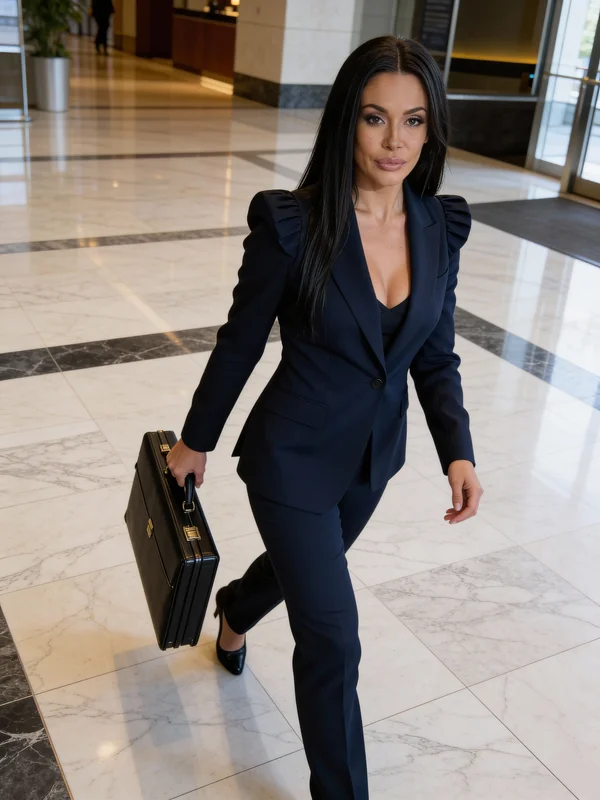
Try "Professional" PhotoShoot → · Open PhotoShoot →
Step 3: Expand Content with Face Swap
Face Swap lets you place your character's face into pre-existing source images. This is faster than PhotoShoot for high-volume content — you find a base image with the right pose and setting, then apply your character's face to it.
Use cases:
- Placing your character in complex scenes or locations that are hard to describe in a prompt
- Using stock-style images as bases and humanizing them with your character's face
- Creating variations on popular poses or aesthetics without re-describing everything
Upload your source face from Step 1 as the "swap face" and the target image as the base. The output keeps the scene intact and replaces the face naturally.
Face Swap works best when the base image has a similar head angle and lighting to your source face. Straight-on portraits swap cleanly; extreme angles require more iteration.
Here's a Face Swap result — character placed into a completely different scene:
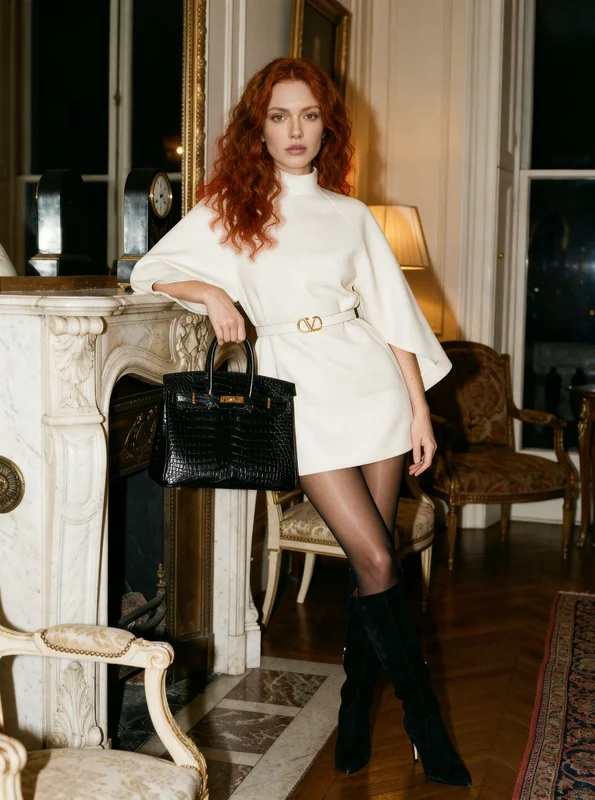
Try "Red in opulent mini dress" → · Open Face Swap →
Step 4: Bring Her to Life (Video Generator)
Static images are good. Moving images are better. Video Generator animates your character from a still image — adding natural body motion, subtle facial movement, and ambient scene animation.
Two main workflows:
Image-to-video: Upload one of your PhotoShoot or Face Swap results, describe the motion you want, and the model animates it. Good for short social clips, reaction videos, and looping content.
Text-to-video: Describe the scene from scratch. More creative control, but requires a strong prompt to maintain character consistency. Works best when you've done enough PhotoShoot content that you know exactly how to describe your character.
For character consistency in video, the image-to-video path is more reliable. Start with a high-quality still from Step 2 or 3.
Here's what the Video Generator produces from a single image:
Try "Acro yoga beach balance" → · Open Video Generator →
Step 5: Add a Voice (Lipsync)
Lipsync takes a video of your character and syncs her lip movement to an audio track — either uploaded audio or text-to-speech.
This is the final step that transforms a visual character into a full media presence. She can introduce herself, answer a question, deliver a tagline, or narrate content.
Workflow:
- Take a video from Step 4 that includes a close-up or medium shot of her face
- Record audio or type text for TTS generation
- Lipsync syncs the two — her lips match the words naturally
Tip: Keep Lipsync clips short (5–15 seconds). Tight close-ups work better than wide shots where the mouth is small in frame.
Try "Starbucks & Terminal Vibes" Lip Sync → · Open Lip Sync →
Keeping Your Character Consistent Across All Content
Consistency is the hardest part of building an AI girlfriend persona. Here's how to maintain it:
Always use the same source face. Save the original Face Generator output in a dedicated folder. Every downstream step — PhotoShoot, Face Swap, Video — references this image.
Document what works. After finding a PhotoShoot template + prompt combination that looks exactly right, save the exact settings. ZenCreator templates are numbered so you can return to the same starting point.
Build a "face reference library." After generating 20–30 images of your character, you'll have a library of angles and expressions. Use these as Face Swap sources to get different looks while maintaining the same identity.
Avoid mixing source faces. Even slightly different source images produce noticeable face drift. Stick to one source image (or a single generation session's outputs) as your character foundation.
Use Cases: What Creators Actually Do With AI Girlfriends
Social Media Influencer Account
The most common use case. Creators build a fictional AI character and run a social media presence as if she were a real influencer. Content includes fashion photos, lifestyle posts, travel content, and behind-the-scenes style clips.
The pipeline looks like: Face Generator → PhotoShoot (seasonal themes, locations) → Video Generator (short clips) → posted across Instagram and TikTok.
Characters with consistent aesthetics — same face, same rough style, same visual language — grow faster than random AI image dumps.
Companion Content
Some creators build AI girlfriend characters for subscription platforms where fans interact with the persona. This combines visual content (ZenCreator images and videos) with a chat layer (using separate AI chat tools for interactive dialogue).
The visual side handles the media. The chat side handles the "personality." Together they create an experience that feels complete.
Brand Persona
Companies building in the AI space sometimes create a fictional character as their brand spokesperson — a recognizable face that doesn't require model releases, usage rights negotiations, or ongoing shoot coordination.
ZenCreator's face consistency tools are well-suited for this: you establish one canonical face, then produce brand content across settings and formats while keeping the identity locked.
ZenCreator vs Candy AI vs SoulGen: Which Is Right for You?
Most people searching for AI girlfriend tools end up comparing ZenCreator, Candy AI, and SoulGen. Here's the honest breakdown:
| Feature | ZenCreator | Candy AI | SoulGen |
|---|---|---|---|
| Full pipeline (image + video + lipsync) | Yes | No | No |
| Video generation | Yes (1080p 60fps) | No | No |
| Face consistency across tools | Yes | Within platform only | Partial |
| Unrestricted output | Yes | Partial | Partial |
| Max image resolution | 4K | Avatar-quality | 1024px |
| PhotoShoot templates | 40+ | No | No |
| Face Swap | Yes | No | No |
| Lipsync | Yes | No | No |
| Chat companion | No | Yes | No |
ZenCreator wins on pipeline and video. If you want to build a real character — images and videos across dozens of settings, all with the same face — ZenCreator is the tool for this job.
Candy AI wins on chat. If you want an interactive AI companion you can have conversations with, Candy AI delivers a polished experience. It's not a visual content production tool; it's a conversation tool.
SoulGen is solid for anime. If your target aesthetic is anime-style rather than photorealistic, SoulGen's anime generation is strong. It lacks the full pipeline though.
For most creators building AI girlfriend content for social media or platforms, the workflow is: ZenCreator for all visual production, and optionally Candy AI as a separate chat layer for audience interaction.
Try These Templates
These ZenCreator templates are perfect starting points for building AI girlfriend content. Each one works with a source face reference to maintain character consistency.
Сouple Photoshoot - 3:4
Romantic Valentine Shoot - 3:4
Elegance among sculptures
Professional
Winter
Cinematic
FAQ
What is the best AI girlfriend generator for photorealistic content?
ZenCreator is the strongest option for photorealistic AI girlfriend images and videos in 2026. It produces 4K images and 1080p video with no content restrictions, and its face consistency tools let you build a character that looks the same across dozens of outputs — something most generators can't do.
Can I create videos of my AI girlfriend?
Yes, using ZenCreator's Video Generator. You can animate still images with natural motion (image-to-video) or generate video from a text description. After that, Lipsync adds synchronized voice audio. The combination lets you create full talking-head style clips of your AI character.
How do I keep my AI girlfriend looking the same across different images?
Save your original Face Generator output as your source face. Use it as the reference in PhotoShoot and Face Swap — both tools accept a face reference image and maintain identity across new scenes. Never use different source images for the same character; face drift is the main reason AI characters lose consistency.
Do I need design experience to use these tools?
No. ZenCreator's tools are template-based — you pick a PhotoShoot template, upload your source face, and the tool does the rest. The main skills needed are: choosing a good source face, writing clear prompt descriptions for Video Generator, and knowing which templates fit your aesthetic.
Is the content I create private?
ZenCreator uses end-to-end encryption on generated content. Your images and videos are private by default — they aren't used for model training or shared without your permission.
Can I use my AI girlfriend character commercially?
Yes. ZenCreator grants commercial use rights on generated content. You can publish images and videos on social media, subscription platforms, and brand materials without additional licensing. Check the current terms of service for full details on commercial rights.
Sources
- Grand View Research — AI Image Generation Market Report (2025): grandviewresearch.com
- Stanford Internet Observatory — Synthetic Media and AI Influencers Report (2025): io.stanford.edu
- ZenCreator platform documentation: app.zencreator.pro
Related guides: