Seedream 4.0 vs 4.5 vs 5.0 on ZenCreator — Which Version to Use (2026)
Seedream 4.0, 4.5, 5.0 side-by-side on ZenCreator. Real image comparisons across portrait realism, prompt adherence, and style range — plus when to pick the faster 5.0 over the photoreal 4.5.

Seedream is ByteDance's image generation family[1] — and on ZenCreator it powers the Text-to-Image tool, Image-to-Image, and the Editor & Combiner. Three versions are selectable: Seedream 4.0, Seedream 4.5, and Seedream 5.0 — each tuned for a different tradeoff.
All images below were generated on ZenCreator with the same prompt on all three versions, so every difference comes from the model itself.
TL;DR — Which Should You Pick?
Use Seedream 4.5 in most cases. It's the photoreal quality leader — best skin, lighting, and texture detail. Pick Seedream 5.0 when you need faster iteration or complex reasoning in the prompt. Pick Seedream 4.0 only if your workflow was built on it before 4.5 landed.
| Your goal | Pick |
|---|---|
| Best photoreal portraits, skin, fabric detail | Seedream 4.5 |
| Typography / text inside the image | Seedream 4.5 |
| Complex multi-element prompts, reasoning | Seedream 5.0 |
| Fastest iteration (3–5s vs 8–14s) | Seedream 5.0 |
| Time-sensitive prompts (real-time data) | Seedream 5.0 |
| Stable legacy workflow | Seedream 4.0 |
1. Portrait Realism — Skin, Eyes, Light
Test prompt: close-up portrait with freckles and natural window light. The classic "can this model render a real human face" stress test — skin pores, eye catchlights, hair-edge detail.
Close-up portrait of a woman with freckles and auburn hair, soft natural
window light, sharp focus on eyes, shallow depth of field, photorealistic
skin texture with visible pores, 35mm film aesthetic, no text no watermarks
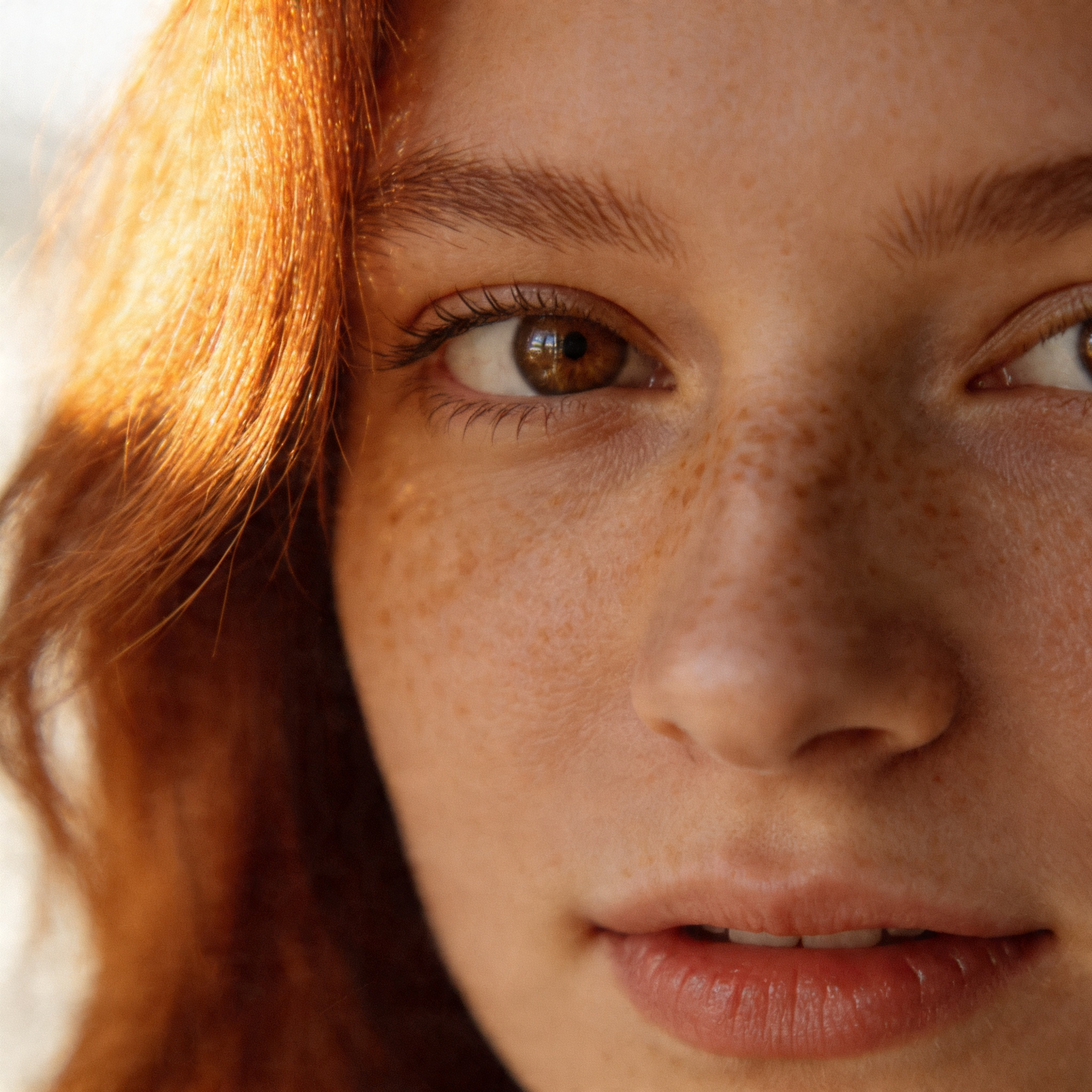
Seedream 4.0
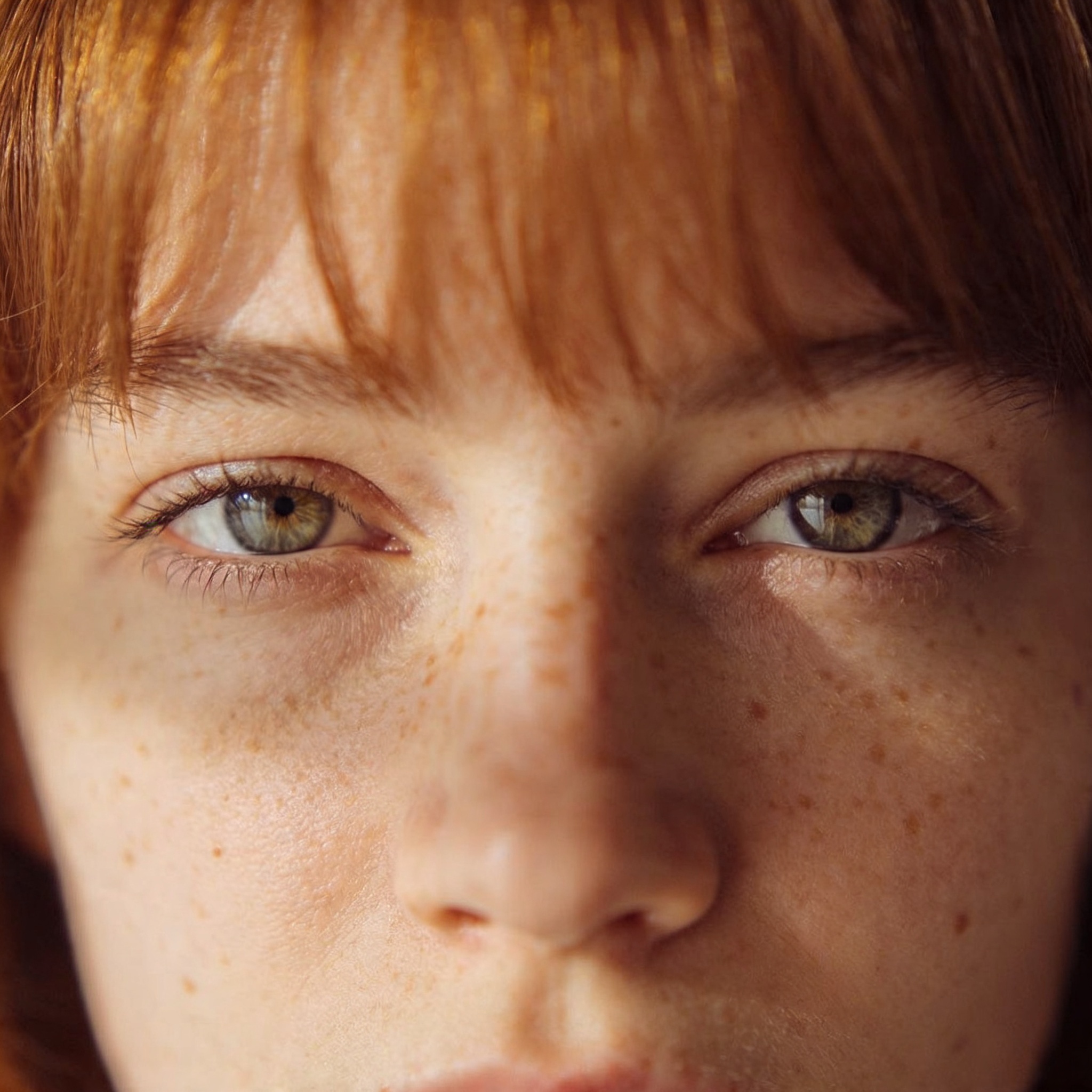
Seedream 4.5
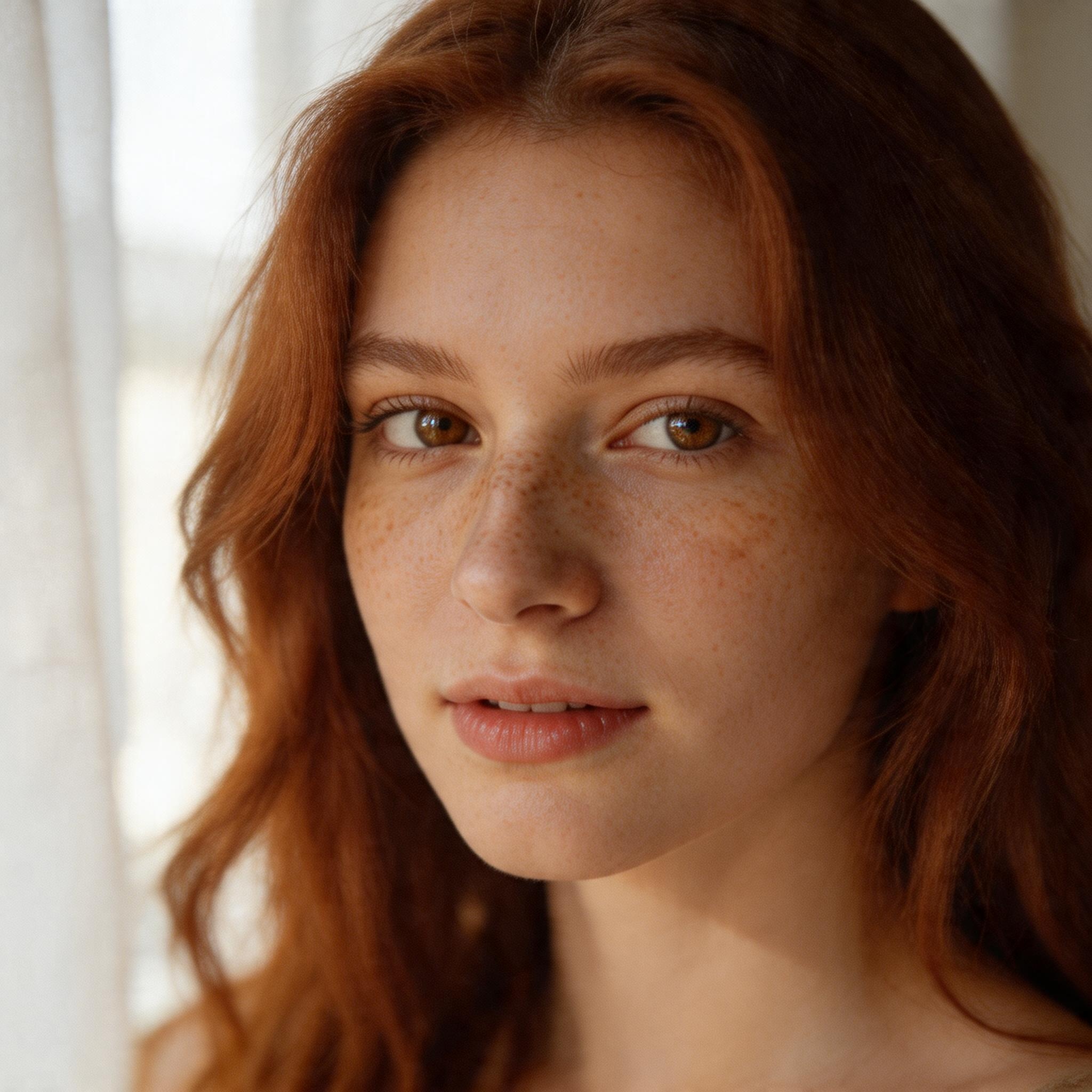
Seedream 5.0
Verdict: 4.5 wins on skin realism — visible pore detail, natural catchlights in the eyes, subtle sub-surface scattering in the cheeks. 4.0 is close but renders slightly plastier skin and flatter shadows. 5.0 is sharper overall but has a more visible "AI look" — skin texture reads smoother and less photographic than 4.5. For hero portraits and brand shots, 4.5 is the pick.
2. Prompt Adherence — Complex Multi-Element Scenes
Test prompt: a multi-subject scene with specific objects, positions, and lighting. This is where 5.0's reasoning advantage shows up — or doesn't.
A woman in a red silk dress sitting on a velvet green chair, holding a cup
of coffee in her left hand and a book in her right hand, large window with
city skyline behind her, golden hour backlight, editorial photography,
no text no watermarks

Seedream 4.0

Seedream 4.5

Seedream 5.0
Verdict: 5.0 is the most disciplined about following the full prompt — correct hand positioning, both objects in the specified hands, skyline visible in the window. 4.5 usually hits 4 of 5 elements cleanly but may drop the book or misplace it. 4.0 tends to simplify — sometimes only one object, sometimes hands positioned ambiguously. For prompts with 4+ specific elements, 5.0 is the safer pick even if the photoreal polish is slightly lower than 4.5.
3. Style Range — Non-Photoreal Aesthetic
Test prompt: a stylized painterly composition that tests whether the model can leave photorealism behind and deliver a distinct artistic look.
Painterly portrait of a young woman with long dark hair, oil painting style,
thick brushstrokes, rich warm palette, 19th-century portrait aesthetic
inspired by John Singer Sargent, dramatic rim light, no text no watermarks
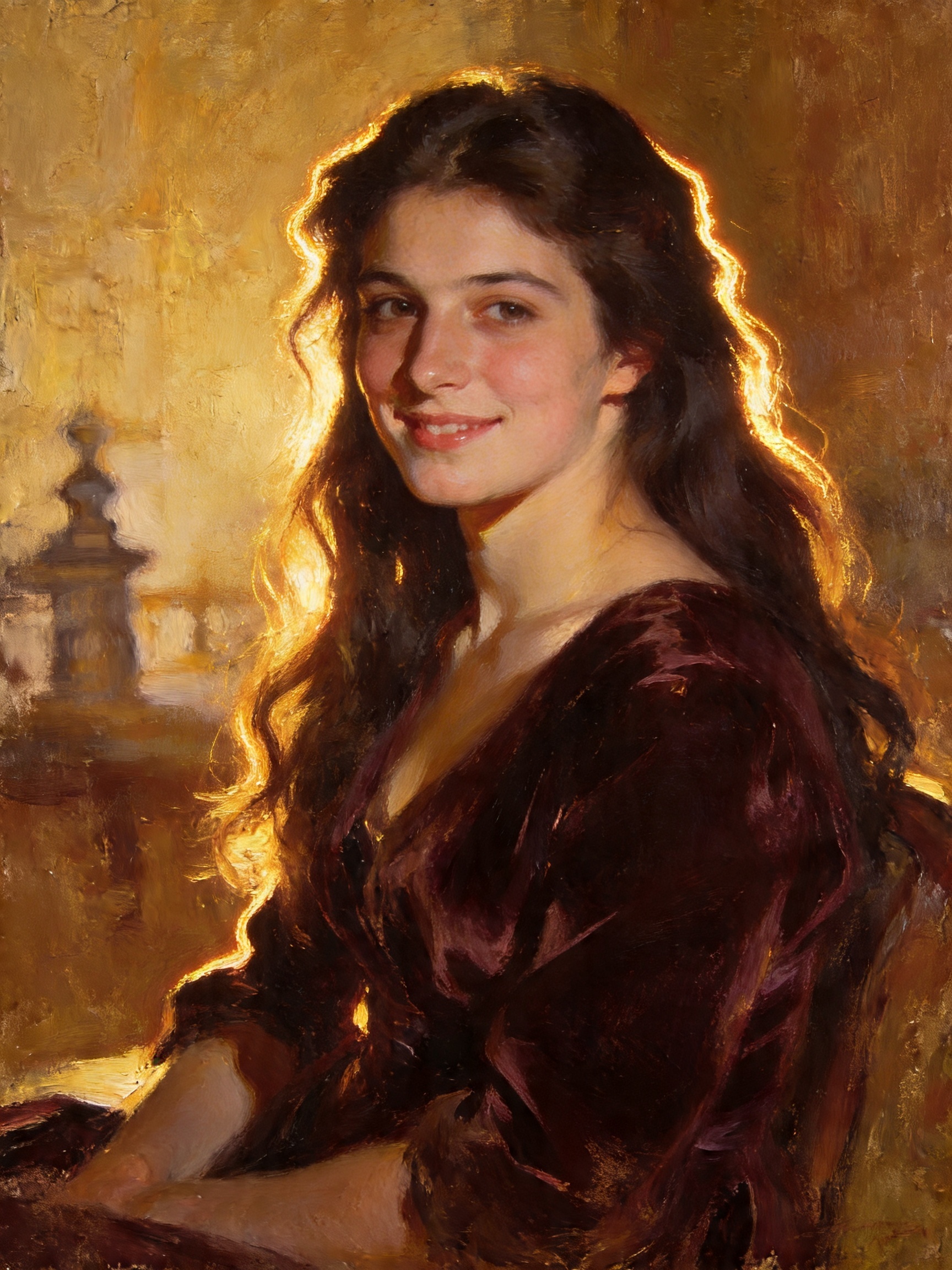
Seedream 4.0
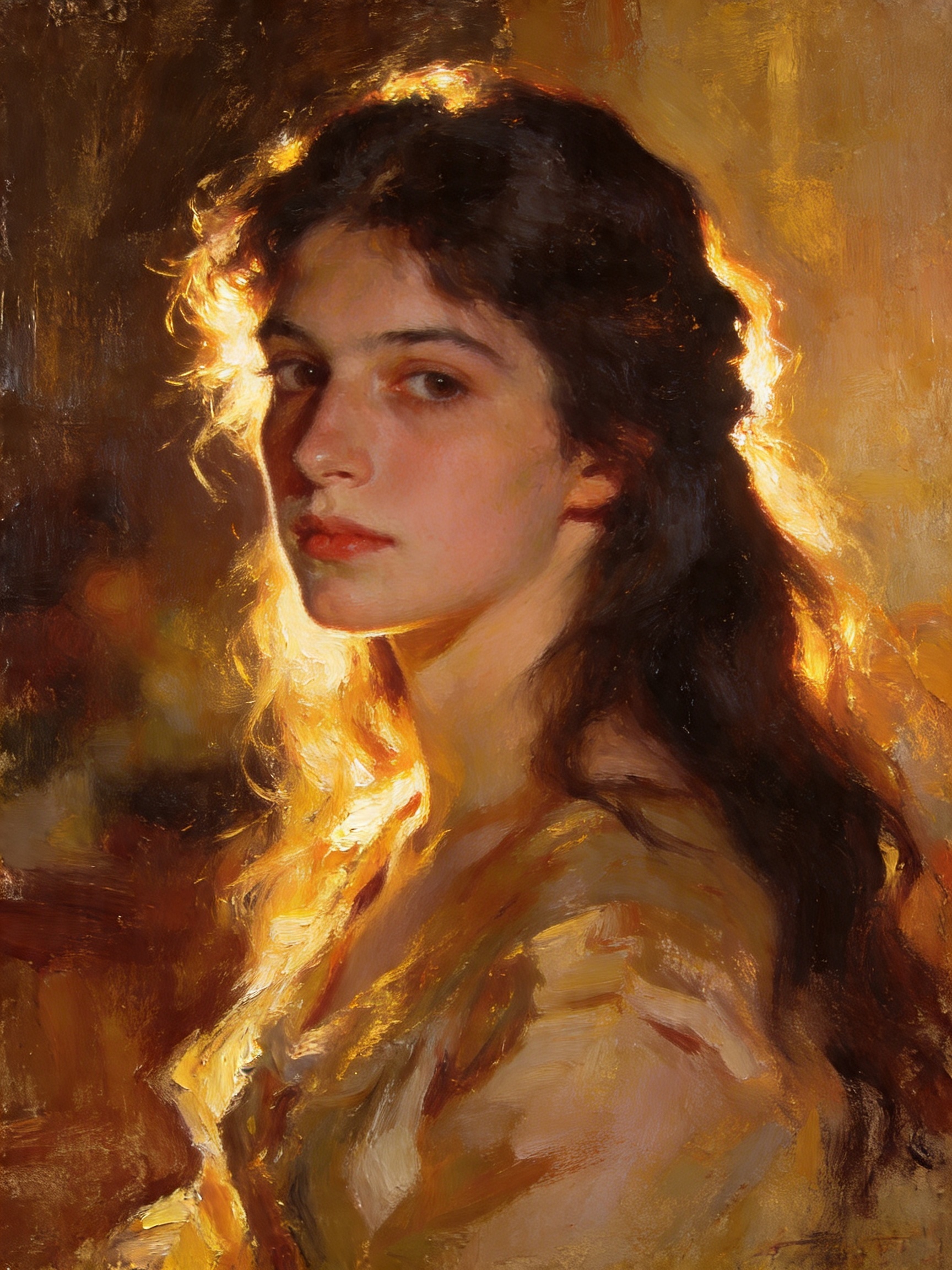
Seedream 4.5
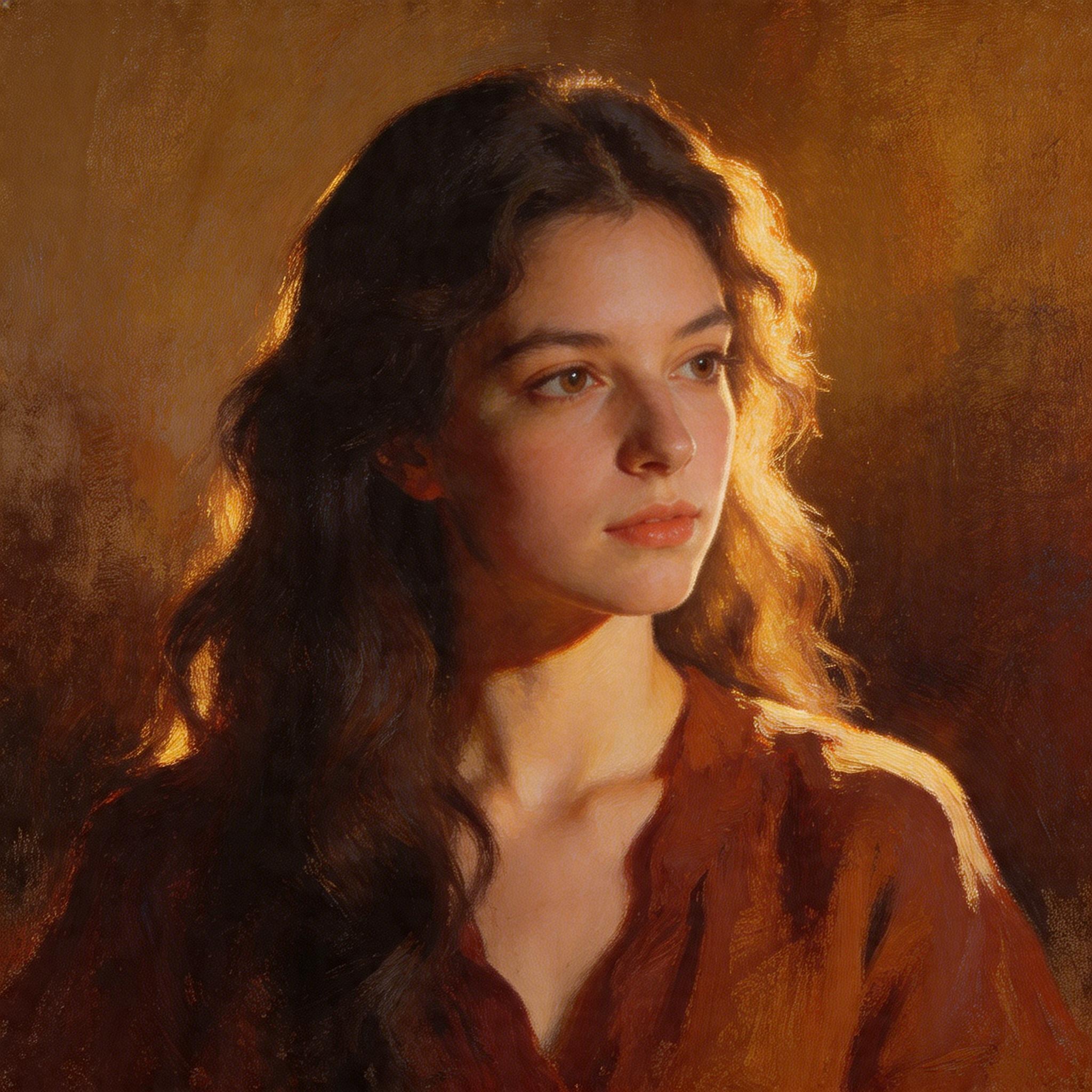
Seedream 5.0
Verdict: all three handle stylized prompts, but the character shifts. 4.5 produces the most convincing oil-painting feel — visible brushstroke texture, canvas-like surface, warm varnish tones. 4.0 leans slightly more towards painterly-digital hybrid. 5.0 renders the style cleanly but more neutrally — less expressive brushwork, smoother transitions. For art-style or campaign work that needs distinct painterly identity, 4.5 still leads.
4. Speed and Cost
Measured on a standard 1024×1024 image at default settings.
| Model | Generation time | Credits per image | Best for |
|---|---|---|---|
| Seedream 4.0 | ~10–15s | Standard | Legacy workflows |
| Seedream 4.5 | ~8–14s | Standard | Hero / campaign content |
| Seedream 5.0 | ~3–5s | Lower | Fast iteration, drafting |
If you're running 20+ prompt experiments, 5.0's speed advantage is significant — five 5.0 generations take about the time of two 4.5 generations.[2] Save the 4.5 runs for your top 3 prompts after iteration.
What our platform data shows
This isn't a guess — these numbers come from ZenCreator's live template library and production usage, not vendor marketing.
| Metric | Number | What it tells you |
|---|---|---|
| Total templates on ZenCreator | 200 | Pre-configured workflows users can fork |
| Image-workflow templates | 112 | 56% of the library is image-first |
| Text-to-Image templates (Seedream-capable) | 20 | Directly configurable with any Seedream version |
| Image Editor templates (Seedream 4.0 backbone) | 23 | Seedream 4.0 powers our Editor & Combiner |
| PhotoShoot themed sets (Seedream-based) | 39 | 40+ themed categories driven by Seedream identity-lock |
| Combined image-template uses tracked | 872+ | On Text-to-Image templates alone |
Observation most guides miss: even with Seedream 5.0 available, our highest-usage Text-to-Image templates still favor Seedream 4.5 as the default — because on character-portrait prompts (the majority of creator content on ZenCreator), 4.5's skin texture lead is more valuable than 5.0's 2–3× speed advantage. 5.0 dominates a different workflow: batch PhotoShoot runs where you need 40 themed outputs fast and will cherry-pick the top 5.
Practical rule, based on what works on our platform:
- Portrait-first creators → default Seedream 4.5, 5.0 only when budget/time is tight
- Lifestyle / scene-first creators (cafes, streets, objects) → Seedream 5.0 is fine; composition matters more than skin texture
- PhotoShoot batch users → Seedream 5.0 for speed, run 40 stills in ~5 minutes instead of ~12
- Editor & Combiner users → stuck on Seedream 4.0 by design (the Editor pipeline is tuned to 4.0), which is fine — 4.0's edit-preservation is strong
5. Text and Typography Inside Images
One underrated Seedream strength is in-image text rendering — model-generated posters, signage, book covers. 4.5 introduced a meaningful jump here.
- Seedream 4.0 — short text is readable; dense text goes fuzzy
- Seedream 4.5 — dense multi-line text renders cleanly, especially for design mockups
- Seedream 5.0 — mid-tier on text; sharper than 4.0 but less reliable than 4.5 on long text blocks
For anything where text inside the image matters (product mockups, posters, magazine covers), use 4.5. For pure visual content with no text requirement, 5.0's speed wins.
6. Bonus — Seedream 5.0's Real-Time Web Capability
Seedream 5.0 is the first image model in the family with native real-time web search[4] — before generating, it detects whether a prompt contains time-sensitive information (a current event, a recent product, a live trend) and can pull current reference data into the render.
When it matters: prompts like "generate a poster for [movie releasing this week]" or "illustrate [current news event]" — 5.0 pulls real visual references. 4.0 and 4.5 rely only on their training cutoff.
When to skip it: most creator workflows don't need real-time data. For evergreen character portraits, lifestyle content, or fashion, the web-search step adds latency without benefit — 4.5 is a better default.
Writing Prompts That Work Across All Seedream Versions
Three rules that apply to every version:
- Lead with the subject, then environment, then style. "A woman in a red dress, standing on a rain-slicked Tokyo street, neon reflections, cinematic" beats "Cinematic photo of neon Tokyo with a woman in red".
- One style cue per prompt. Pick one: photoreal, painterly, anime, 3D render. Mixing two ("photoreal anime") produces muddy output across all three versions.
- Concrete nouns over adjectives. "Freckles on cheek, 35mm film grain, soft window light" beats "beautiful cinematic professional portrait". Seedream models anchor on concrete visual nouns.
FAQ
How do I access Seedream on ZenCreator?
All three Seedream versions (4.0, 4.5, 5.0) are available on every plan — pick the version from the model dropdown on any generation tool. ZenCreator uses pay-once credit packs from $19.99, and credits never expire.
Which Seedream version is best for most users?
Seedream 4.5. It's the current photoreal quality leader — best skin, lighting, texture, and typography. Only switch to 5.0 when you need fast iteration or prompts with 4+ distinct elements that require stronger reasoning.
What makes Seedream different from Nano Banana or Midjourney?
Seedream is optimized for unified generation + editing — the same model that creates the image can edit it in-place via the Editor tool. Nano Banana is Google's model tuned for conversational image editing. Midjourney is stylized-artistic by default. For professional-grade photoreal output plus in-app editing, Seedream 4.5 is the strongest all-rounder.
Does Seedream 5.0 replace 4.5?
No — they're tuned for different tradeoffs. 5.0 is faster and reasons better about complex prompts. 4.5 produces better photoreal skin, lighting, and text rendering. Most professional workflows keep 4.5 as the hero-shot default and use 5.0 for rapid iteration.
Can Seedream generate unrestricted content?
Yes — ZenCreator's deployment of Seedream runs without the content filter layer present in ByteDance's public API. All three versions handle creative prompts that public endpoints reject. See the AI image generator with no restrictions for full context.
What's the max resolution Seedream can generate?
1024×1024 at base. For higher resolution, generate at base and run through the Upscaler tool — up to 4× upscale with Face-Safe mode preserves skin texture without distortion.
Can I use Seedream for image-to-image editing?
Yes — all three versions work in Image-to-Image and Editor & Combiner. 4.5 is the strongest pick for editing because it preserves reference details most accurately.
When should I pick Seedream over Nano Banana?
Seedream 4.5 for photoreal campaign content and anything needing sharp skin texture. Nano Banana for conversational editing workflows ("make it warmer", "add a hat") where you want incremental natural-language adjustments rather than full re-generation.
Templates to try on any Seedream version
Every Text-to-Image template on ZenCreator lets you pick your Seedream version from the model dropdown. Open a template, switch to 4.5 for photoreal or 5.0 for speed, generate.