Kling 2.1 vs 2.5 vs 2.6 on ZenCreator — Which Version to Use (2026)
Kling 2.1, 2.5, 2.6 side-by-side on ZenCreator. Real video comparisons across quality, prompt adherence, and motion range — plus Kling 2.6's simultaneous audio-visual generation.

Kling is Kuaishou's AI video generation family[1] — and on ZenCreator it is the go-to engine for cinematic polish and, since 2.6, simultaneous audio-visual generation. We compare three versions side by side: Kling 2.1 (fast drafting workhorse), Kling 2.5 (speed + identity retention), and Kling 2.6 (best quality + audio in a single pass).
All videos below were generated on ZenCreator with the same prompt and same source image on all three models. Every difference you see comes from the model itself.
TL;DR — Which Should You Pick?
Use Kling 2.6 for hero content and anything needing audio. Pick Kling 2.5 for volume generation with strong identity retention at lower cost. Pick Kling 2.1 for fast iteration when final quality matters less.
| Your goal | Pick |
|---|---|
| Best quality, cinematic hero clips | Kling 2.6 |
| Audio + visuals in one pass (voiceover, SFX, ambient) | Kling 2.6 |
| High-volume production, strong identity retention | Kling 2.5 |
| Cheapest per clip (~30% less than 2.1) | Kling 2.5 |
| Fastest drafts, prompt iteration | Kling 2.1 |
| Maximum clip length at acceptable quality | Kling 2.1 |
1. Quality — Realism, Skin, Light
Test prompt: cinematic editorial scene — a woman in a luxurious cherry-blossom room, slowly extending a red apple toward camera. Tests skin quality, fabric texture, petal physics, and smooth camera dolly.
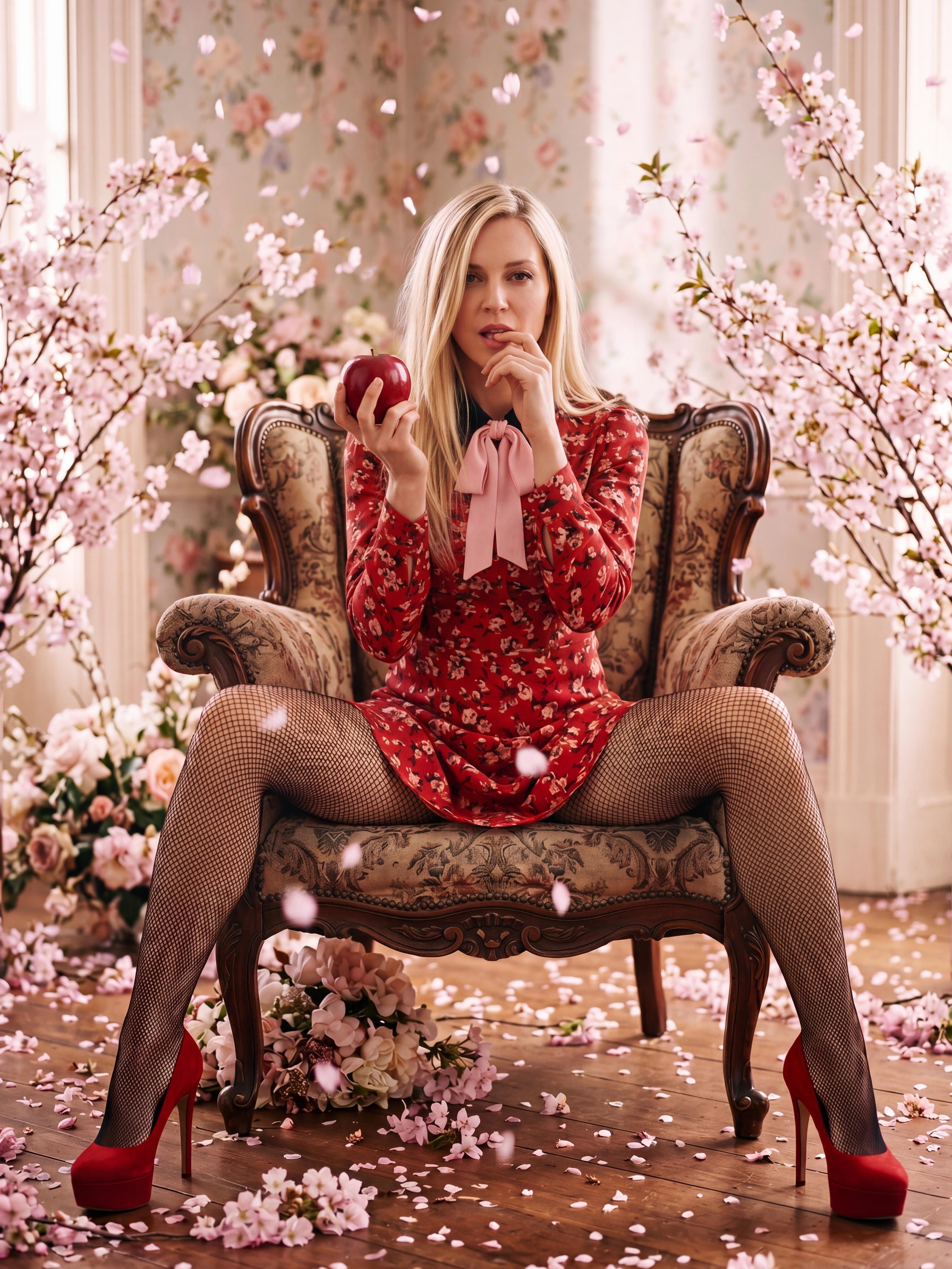
Source image used as the first frame for all three model runs below.
cinematic editorial animation, blonde woman seated in a carved antique
armchair in a luxurious spring-themed room filled with cherry blossom
branches, floral wallpaper, scattered pink petals, and soft romantic decor,
wearing a red floral dress, black fishnet pantyhose, and glossy red platform
heels, sakura petals drifting slowly from above during the whole video,
the camera gradually moves closer to her in a gentle forward dolly shot,
intimate and elegant, while she slowly raises and extends a red apple toward
the camera as if offering it to the viewer, then smiles sweetly and warmly,
soft warm light, dreamy spring atmosphere, subtle motion in hair, fingers,
and fabric, detailed textures, photorealistic, ultra detailed, smooth
graceful motion, refined luxury mood
Kling 2.1
Kling 2.5
Kling 2.6
Verdict: 2.6 produces the richest fabric textures (the fishnet, the floral dress pattern, petal translucency) and the smoothest dolly motion — the apple-extend gesture is fluid start to finish. 2.5 matches the camera move well but has slightly less detail on fine fabric and hair-strand motion. 2.1 handles the scene but the petal physics are stiffer and the camera dolly has visible micro-jitter. For cinematic editorial content, 2.6 is the clear pick.
2. Prompt Adherence — Multi-Step Action Sequence
Test prompt: a 4-step action chain — hand gesture, speaking, kiss. Designed to test whether the model follows a playful sequence in order or collapses to a single pose.
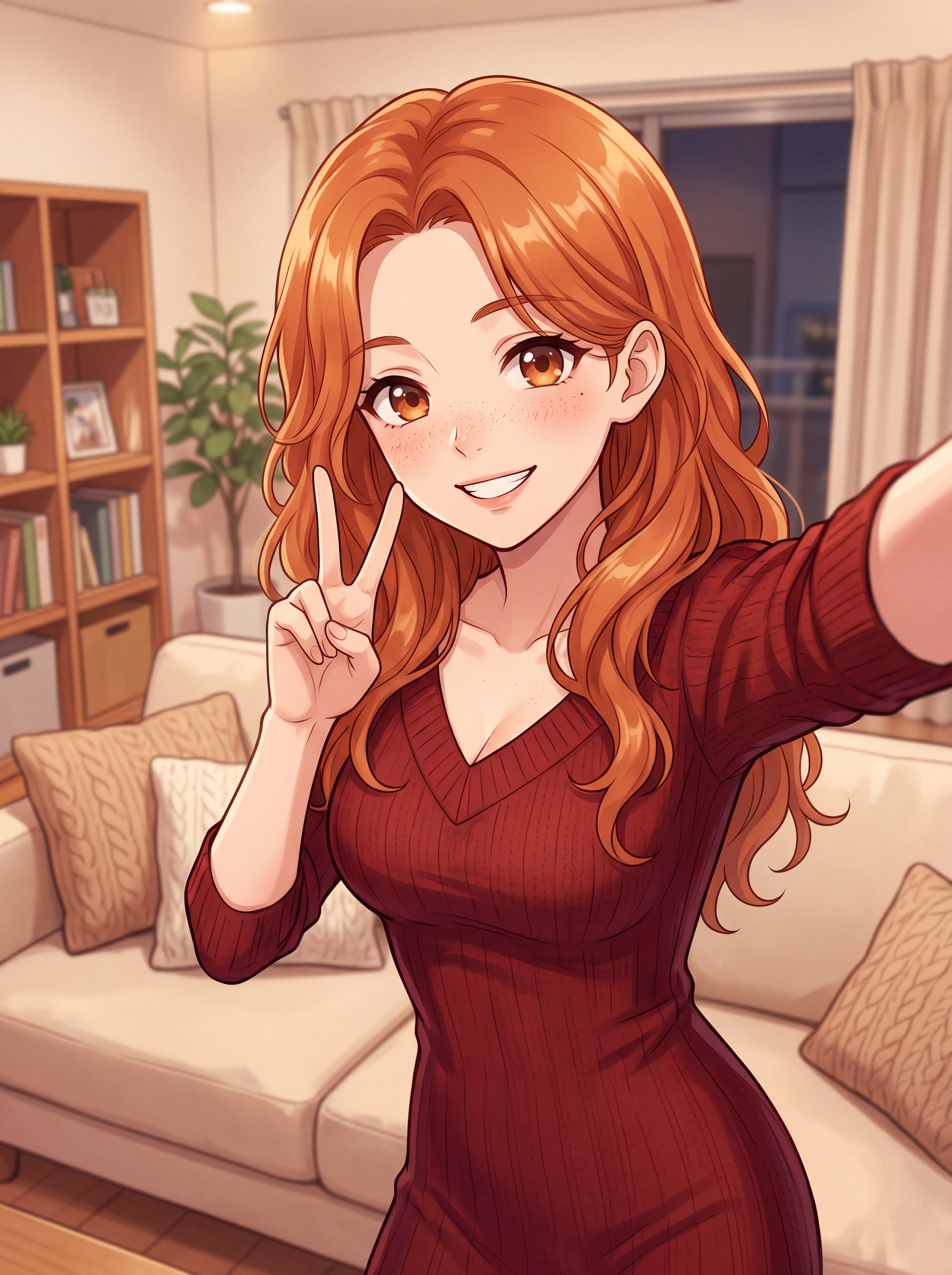
Source image used as the first frame for all three model runs below.
A beautiful girl looks at the camera, she raises her hand and makes a peace
sign, then lowers it slightly, speaks playfully with moving lips, and at the
end blows a kiss toward the camera, smooth and cute animation
Kling 2.1
Kling 2.5
Kling 2.6
Verdict: 2.6 nails the full sequence — peace sign → lower → speak → blow kiss — in order and with natural timing. 2.5 handles the peace sign and speech but the blown kiss often lands weak or late. 2.1 typically picks one action (the peace sign) and holds it, dropping the rest. For playful multi-step content — reaction clips, Reels, cute gestures — 2.6 is the only version that follows a chained instruction reliably.
3. Motion Range — Active Body Movement
Test prompt: hyper-complex cinematic scene — helicopter takeoff behind a snowboarder at golden hour, with flying snow particles, hair blowing, focus pulls. The hardest physics-simulation stress test: wind, snow particles, fabric, camera shake, and depth-of-field transitions all at once.
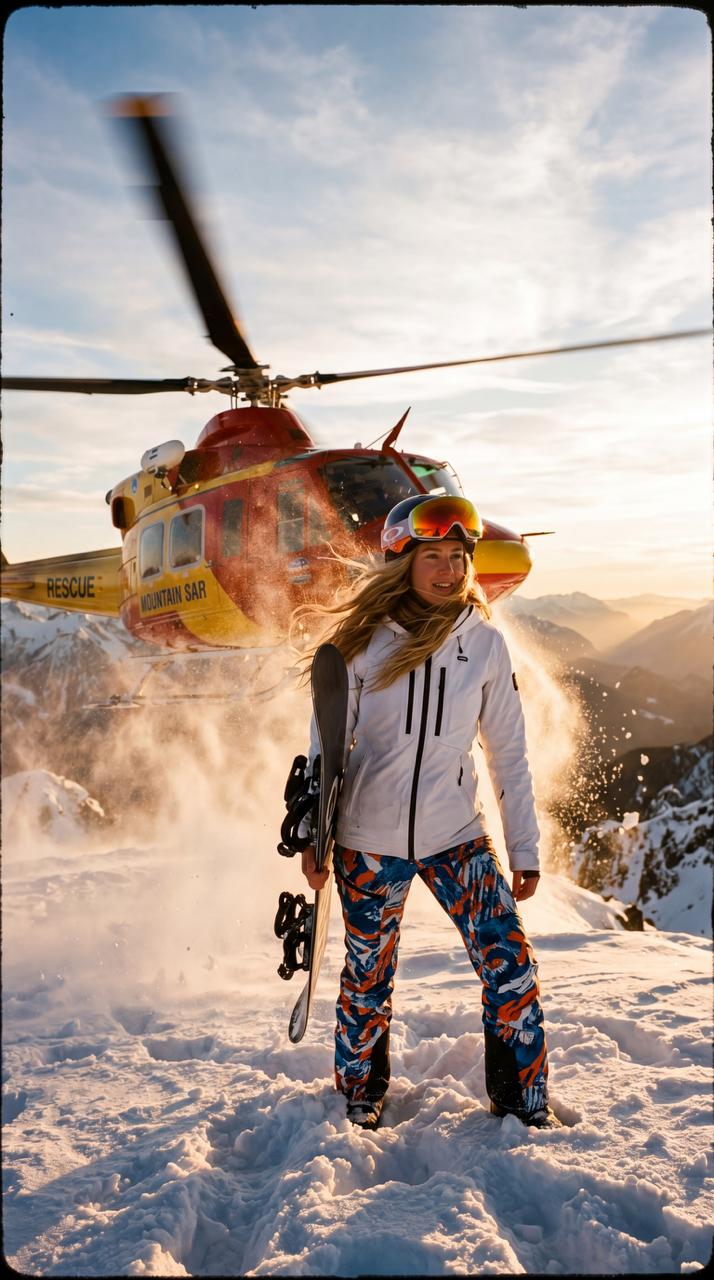
Source image used as the first frame for all three model runs below.
A hyper-realistic cinematic video shot at the summit of a snow-covered
mountain during golden hour sunset. A young woman stands in the foreground
holding a snowboard, wearing a fitted white ski jacket and colorful ski
pants. Her long hair is loose and flowing in the wind.

Behind her, very close, a helicopter is starting an aggressive takeoff. The
rotors spin at high speed, creating intense downwash — snow bursts into the
air in all directions, forming a chaotic storm of flying snow and ice
particles. Strong wind from the helicopter blows the woman's hair and
clothes dramatically.

As the helicopter lifts off, rising just behind her, the scene becomes more
intense — snow swirls heavily, visibility slightly drops, sunlight cuts
through the particles creating glowing highlights.

Action: The woman slowly turns her head and upper body toward the helicopter,
reacting to the sound and force, her movement confident and slightly
cinematic, like in a fashion film. Her goggles catch a bright sun flare as
she turns.

The helicopter continues ascending and moving forward into the sky, partially
crossing the frame, with strong motion blur on the blades.

Golden sunset light casts warm tones across the snow and the subject, with
long shadows and atmospheric haze over distant mountain peaks.

Camera style: handheld cinematic shot, slight natural shake from wind,
shallow depth of field, focus shifts from the woman to the helicopter and
back. Slightly imperfect framing for realism.

Visual style: ultra-realistic, high detail, natural lighting, cinematic color
grading, subtle grain, dramatic contrast between warm sunset and cold snow
environment.
Kling 2.1
Kling 2.5
Kling 2.6
Verdict: this prompt is a brutal stress test — and the version gaps are enormous. 2.6 renders the helicopter downwash with realistic snow particle physics, the hair blows convincingly, the head-turn toward the helicopter is smooth and timed naturally, and the depth-of-field shift from subject to helicopter works. 2.5 handles the snow and wind but the helicopter motion is stiffer and the focus pull less convincing. 2.1 simplifies heavily — the snow particles lack volume, the helicopter barely moves, and the head-turn often doesn't complete. For complex cinematic scenes with multiple physics systems running simultaneously, 2.6 is in a different league.
4. Speed and Cost
| Model | Typical time (5s clip) | Relative cost | Best for |
|---|---|---|---|
| Kling 2.1 | ~15–25s | Baseline | Fast iteration, high-volume drafts |
| Kling 2.5 | ~20–30s | ~30% cheaper than 2.1[2] | Volume production with quality |
| Kling 2.6 | ~30–45s | Premium | Hero content, final renders |
The counterintuitive insight: Kling 2.5 is cheaper than 2.1 — Kuaishou optimized the inference pipeline so 2.5 delivers better quality at lower cost per clip. This makes 2.1 a niche pick (pure speed) rather than a cost-saver.
5. Bonus — Kling 2.6 Audio (Simultaneous Audio-Visual)
Kling 2.6 introduced a feature no other version has: simultaneous audio-visual generation[3]. In a single pass, the model generates visuals, natural voiceover, sound effects, and ambient atmosphere. No separate audio track, no lip-sync step, no post-production merge.
When it matters: any clip where you hear the scene — footsteps on pavement, wind in hair, cafe background noise, a character's spoken line. 2.6 bakes these into the MP4 directly.
When to skip it: purely visual content destined for Reels with music overlay. If you're dropping the audio track anyway, 2.5 saves cost without quality loss.
On ZenCreator, audio generation is enabled by default on Kling 2.6 — no separate toggle needed. The output MP4 arrives with a stereo AAC audio track.
Writing Prompts That Work Across All Kling Versions
Three rules that apply to every version:
- Lead with the subject, then the motion, then the environment. "A woman turns toward camera with a soft smile, natural window light" beats "Natural window light setting with a woman turning." Kling anchors on whatever comes first.
- One camera intent per clip. Pick one: static, slow orbit, dolly-in, handheld follow. Stacking two camera moves produces drift on all three versions.
- Technical specs for cinematic looks. Adding
24fps, shutter 1/48, mild grainpushes Kling toward a film aesthetic. Leave them out for smooth-motion social-ready output.
What our platform data shows
Numbers from ZenCreator's live template library — real adoption, not vendor marketing.
| Metric | Number | What it tells you |
|---|---|---|
| Total Kling videogen templates | 25 | Largest engine family on the platform |
| Templates on Kling 2.1 | 15 | Legacy workhorse, many proven templates |
| Templates on Kling 2.6 | 9 | All new templates default to 2.6 |
| Templates on Kling 2.5 | 1 | Transitional — most creators jumped straight from 2.1 to 2.6 |
| Top template (Kisses – 10s) uses | 4,365 | Kling 2.1, still the single most-used video template on the platform |
| Kling 2.6 templates with audio | 9 of 9 | Every 2.6 template ships with audio enabled |
Observation most guides miss: despite 2.6 being the quality leader, the most-used Kling template still runs on 2.1 — because Kisses-10s was the first template on the platform and accumulated users before 2.6 existed. New templates default to 2.6 exclusively, so the version balance is shifting fast.
Practical rule, based on what works on our platform:
- Campaign / brand creators → Kling 2.6 exclusively (quality + audio in one pass)
- Social content at volume → Kling 2.5 (best cost-per-quality ratio, 30% cheaper than 2.1)
- Prompt experimentation → Kling 2.1 (fastest, cheapest per second, fine for drafts)
- Any clip with sound → Kling 2.6, no alternative (only version with audio)
Kling Templates Ready to Use
Pre-built video templates running on Kling. Click any card — the prompt is already loaded, just hit generate.
FAQ
How do I access Kling on ZenCreator?
All three Kling versions (2.1, 2.5, 2.6) are available on every plan — pick the version from the model dropdown on any video tool. ZenCreator uses pay-once credit packs from $19.99 (credits never expire), not a subscription.
Which Kling version is best for most users?
Kling 2.6. It wins on quality, prompt adherence, motion fluidity, and is the only version with audio generation. Only drop to 2.5 or 2.1 if you need cost savings or faster iteration.
Does Kling have content filters like Sora or Runway?
Kling applies a safety filter that can reject certain motion or wardrobe prompts. If your workflow needs maximum content freedom, WAN is the unrestricted alternative on ZenCreator — same tool, different engine in the dropdown.
What's the difference between Kling 2.6 and Kling 2.6 with audio?
On ZenCreator, Kling 2.6 generates audio by default — there's no separate "audio mode." Every 2.6 clip arrives with a stereo AAC track including voiceover, SFX, and ambient sound. To get a silent clip, mute in post.
Can Kling do image-to-video?
Yes. Upload any image as the source frame, select a Kling version, write a motion prompt — the model animates your image into a 5–10 second clip. See our Image-to-Video guide for the full workflow.
What's the longest clip Kling can generate?
10 seconds per generation on all three versions. For longer content, chain multiple clips using the same character + prompt style.
When should I pick Kling over WAN or Seedance?
Kling for cinematic polish and audio. WAN for unrestricted content. Seedance for fastest iteration and lowest cost. Full comparison: all ZenCreator video engines.
Why is Kling 2.5 cheaper than 2.1?
Kuaishou optimized the inference pipeline between versions[2] — 2.5 runs on more efficient architecture, which reduced cost per clip by ~30% while improving quality. It's a genuine upgrade, not a downgrade at lower price.