For Creators & Business

AI Creative Studio for Creators and Businesses

ZenCreator is an AI content creator for photo and video: generate, edit and animate visuals for your feed, your clients or your catalog. Work in the browser app or automate through the API and MCP, and run whole batches on one credit balance.

Already have an account? Open the app

AI fashion photo made in ZenCreator: a man in a printed short-sleeve shirt and jeans sitting on a fence in a flower meadow
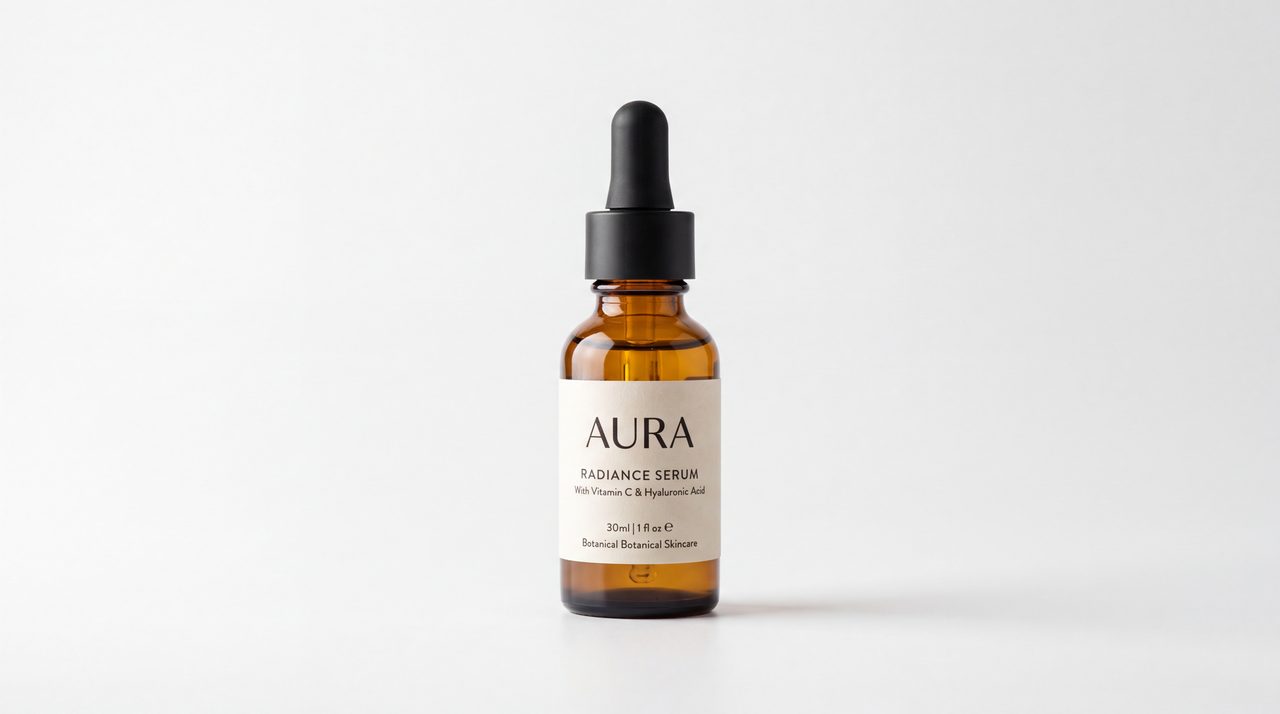
AI product photo made in ZenCreator: an amber serum dropper bottle on a clean white background
AI studio portrait made in ZenCreator: a man in a dark blazer with studio lights behind him
  • Every generation tool through one REST API

    Image and video tools, with copy-paste examples in the docs.

  • MCP for Claude, ChatGPT, Cursor and Claude Code

    Describe the job in chat and your assistant runs the tools.

  • Up to 1,000 reference images per Variations batch

    Each reference returns its own set of new shots.

An AI content creator for photos and videos

If you use AI for content creation and most of that content is visual, ZenCreator puts the core steps in one place: generate images, edit and upscale photos, turn stills into clips, build multi-shot videos and add voices, music and sound.

Think of it as an AI-powered creative studio in your browser. You create and edit in the app, or hand the same tools to your code or your AI assistant through the API and MCP. The account and the credits stay the same either way; this page is the overview, and the work happens in the app.

Made for: photos, video clips, multi-shot videos and audio for video. Not the focus: long-form writing such as blog posts or newsletters.

AI tools for content creators: sets, clips and posts

Pick the job in front of you; each card names the AI creator tools in ZenCreator that handle it.

The same AI-generated woman in a grey turtleneck sweater, four-photo set made in ZenCreator: full-length shot in an autumn park alley
The same AI-generated woman in a grey turtleneck sweater, four-photo set made in ZenCreator: three-quarter shot among autumn trees
The same AI-generated woman in a grey turtleneck sweater, four-photo set made in ZenCreator: hands-in-pockets shot on a leaf-covered path
The same AI-generated woman in a grey turtleneck sweater, four-photo set made in ZenCreator: waist-up shot in a sunlit pine forest

Keep one character consistent across a photo set

Photoshoot builds a multi-image shoot from a face photo and a body reference and is built to keep the face recognizably the same across the categories you choose. Variations then turns a favorite frame into fresh angles and crops for a carousel.

Tools: Photoshoot

Turn one image into a short talking clip

Image to Video animates a still, in batches of up to 100 clips. LipSync makes the face speak your recorded audio at 1080p, with expressions that follow what is being said.

Tools: AI Video Generator · Lip Sync AI

Image Editor result for a social post: a woman in a white sweater posing with a perfume bottle on a soft pink brand-colored background

Post on-brand images in the right format

Image Editor changes an outfit, background or location and can apply one style across a whole set, so a series of posts reads as one campaign. Set the aspect ratio in Photoshoot or Variations, such as 1:1 or 9:16, to match the feed you post to.

Tools: AI Photo Editor · Image Upscaler

AI image generator for business: choose your team

ZenCreator is also an AI video generator for business. Pick the team closest to yours to see which tools fit and where to go next.

Create and edit, then run it at scale

The limits below come from each tool's documentation, so you can plan a batch before you spend credits. For the full module list, see the content creation overview.

Variations output: one reference photo of a beige ceramic mug and four new angles and close-up crops generated from it with the same lighting

Get a full set from one reference

Variations returns up to 10 new angles or crops per reference and keeps color grade, lighting and subject consistent, at the aspect ratio you choose.

Before Image Upscaler: low-resolution portrait of a man in window light, close-up of the eye and stubbleBefore
After Image Upscaler: the same portrait enlarged, sharper skin texture, eyelashes and stubbleAfter

Sharpen finals up to 8K

Image Upscaler enlarges an image and cleans up softness and noise, with target resolutions up to 8K depending on the mode.

Four stills of one multi-shot video made in ZenCreator. Shot 1: A ceramicist shaping a teapot at a pottery wheel in a sunlit studio
Shot 2: Close-up of her hands glazing the teapot sage green
Shot 3: Lifting the glazed teapot out of the kiln
Shot 4: Pouring tea for a friend at a breakfast table

See the plan and price before a video renders

Video Builder turns one idea into a multi-shot video from 15 seconds to 3 minutes. It writes the scenes, shots, cast and a price for every part first, then shows stills, so you fix faces and framing before filming.

Edit a whole batch the same way

Batch Mode in Image Editor applies one prompt to every uploaded image separately, one result per image. Change backgrounds, outfits or style across a set without rewriting the prompt for each photo.

Swap one face across up to 1,000 photos

Head & Face Swap maps one source face onto up to 1,000 target images per batch, matching lighting and skin tone. It unlocks after your first credit purchase and may only be used with the consent of the people shown.

Add voice, music and lip sync

Zen Audio generates voices, music and sound effects in one pass, up to 2 minutes of audio. LipSync then animates a photo to speak it, billed per second of audio.

Ready to try one of these? Open the app

Three ways to work: app, API or MCP

Choose by how you like to work; the tools and the results are the same.

Who it suits
Anyone who wants to work hands-on
How you work
Open a tool, upload, review results in a desktop or mobile browser
Setup
Sign in
Credits
Your balance
Strongest at
Editing, reviewing and picking the best shots
Who it suits
Developers and technical teams
How you work
Start a task, check its status, download from the result URL
Setup
Create a key at app.zencreator.pro/api-keys, then copy an example from the docs
Credits
Same balance, same cost per tool as in the app
Strongest at
Generation inside your own product, within per-endpoint rate limits
Who it suits
People who already work in Claude, ChatGPT, Cursor or Claude Code
How you work
Ask in plain language; the assistant picks the tools and chains them
Setup
Add one server URL and log in once with OAuth 2.1; no API key in the client
Credits
Same balance; the assistant checks it and quotes the cost first
Strongest at
Repeat jobs, such as fifty hero shots from one instruction

All three draw on one credit balance, with no separate API or MCP subscription.

From idea to finished asset

  1. 1. Choose a tool or connect your assistant

    Open the tool for the job in the app, or give Claude, ChatGPT, Cursor or Claude Code the ZenCreator MCP server URL.

  2. 2. Add references or describe the result

    Upload a face, a product shot or a set of photos, or write what you need; the templates inside each tool show what to expect.

  3. 3. Check the cost before you start

    Tools such as Variations and Head & Face Swap show the credit cost before you confirm, and Video Builder and MCP quote the full price first.

  4. 4. Download, refine or scale up

    Download one result or the whole batch as a ZIP, send it on to another tool, or retry only the items that failed.

Know which route fits? One credit balance covers the app, the API and MCP.

See credit packs

Commercial use, rights and safety

Commercial use under the Terms

Commercial use is permitted under the ZenCreator Terms, subject to your compliance, applicable rights, and the terms governing the service and source materials. The license covers the images and videos you generate and is non-exclusive.

Your uploads and real people

Only upload images you have the right and permission to use. If an image includes another person, make sure you have the consent required for your intended edit and use.

Screening and age eligibility

Prompts and uploaded images are automatically screened before generation. You must be at least 18 to use ZenCreator.

Data and deletion

Dimeris Ltd, the Cyprus company that operates ZenCreator, processes data in line with the GDPR and does not sell personal data. Delete your account in Settings or by email; deletion completes within 30 days, and limited records may be kept where required or permitted.

Terms and Conditions · Content Policy · Privacy Policy · Data Deletion

Two ways to buy

Self-serve

  • Buy a credit pack on Pricing; current packs are listed there.
  • Credits never expire and work in every tool.
  • The API and MCP draw on the same credits.
  • Optional auto top-up for card payments.
  • Head & Face Swap and some other tools unlock after your first purchase; there is no trial period.
See credit packs

Large volumes

  • Tell us your monthly volume, the tools you need and how you want access: web, API or MCP.
  • The team reviews your project and replies by email.
  • Solo work? Self-serve is the direct route.
Tell us about your project

Planning large volumes? Tell us about your project

Seven short questions tell the team your volume, tools and access route before they reply.

Required
Task:
Monthly volume:
Access route:
Timeline:
Optional

By sending this form, you agree that ZenCreator may use these details to reply to your request, as described in the Privacy Policy.

Questions before you start

Is ZenCreator Studio a separate app?

No. This page is an overview of what ZenCreator does for creators and businesses; the work itself happens in the ZenCreator app, with the same account and credits. There is nothing to install: the app runs in desktop and mobile browsers, and a tablet version works the same way.

I'm a solo creator, not a company — can I use ZenCreator?

Yes. Any credit pack on Pricing gives you every tool in the app, plus API and MCP access on the same balance. Because credits never expire, a small pack lasts as long as you need it. The volume form is meant for teams with large monthly needs.

Is there a trial period?

No. Access starts with any credit pack, and every credit you buy goes to your balance for generations. Your first purchase also activates Trusted Status, which unlocks Head & Face Swap and certain models that are hidden before payment.

Do I get exclusive rights to what I generate?

No. The Terms grant a non-exclusive, worldwide license to use, reproduce, display and commercially exploit generated output, subject to the Terms, full payment of applicable fees, applicable law and agreements with infrastructure or model providers. Similar or identical outputs may be generated for other users, so a concept or style is never yours alone.

Do you offer enterprise plans, SSO or team seats?

Current plans are self-serve credit packs, listed on Pricing. If your company needs SSO, team seats, invoicing or custom terms, describe the requirement in the project form and the team will reply.

Are there API rate limits?

Yes. Each endpoint limits how many requests you can send per minute, to keep the system stable for everyone; the exact numbers are in the API documentation. A call through the API costs the same credits as the same tool in the app.

Will every result be ready to use as is?

Not always. Results depend on your inputs, and some outputs can show artifacts or small inconsistencies; clear, well-lit references and step-by-step edits help. Most tasks finish in 1–5 minutes. Credits are deducted when a task starts; if a generation fails because of a verified issue on ZenCreator's side, the credits are typically returned automatically.

Who runs ZenCreator

ZenCreator is a brand of Dimeris Ltd, a company registered in the Republic of Cyprus. The policies linked on this page are issued by that company.

  • Registration number: HE 486070
  • Registered office: SOHO Embassy, Omonoias Avenue 13, Limassol 3052, Cyprus
  • Offices: Limassol and Larnaca

About ZenCreator · Terms and Conditions · Privacy Policy

Make your next photo and video batch with ZenCreator

The same AI tools for creators and for business teams, on one credit balance that never expires.